
March 23, 2026
Phosphor Burn and Night Vision Tube Damage: What Actually Destroys NV Gear
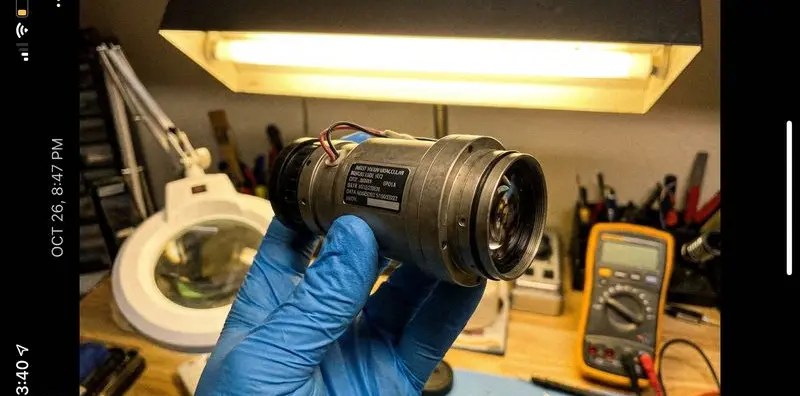
Night vision devices fail in ways most buyers dont anticipate. The tube is the most expensive and most replaceable-at-cost component in any image-intensified NV device, and it can be damaged by mistakes that take only seconds. Knowing what destroys NV tubes — and how to avoid it — is one of the most practical things you can learn before buying your first serious piece of gear.
This guide focuses on image-intensified tubes specifically (Gen 2, Gen 2+, Gen 3). Thermal and digital NV devices have their own failure modes, covered briefly at the end.
How image intensifier tubes actually work
Understanding how tubes fail requires a baseline understanding of what they do. An image intensifier tube converts incoming photons into electrons through a photocathode, amplifies those electrons through a microchannel plate (MCP), and converts them back into a visible image on a phosphor screen.
The phosphor screen is the final stage — it glows green (or white, in white phosphor units) wherever electrons hit it. This phosphor is directly analogous to an old CRT television screen, and it has the same vulnerability: sustained high-intensity exposure to the same point or pattern can burn a ghost image into the phosphor permanently.
The photocathode — the first stage — can also be damaged by excessive light input, creating permanent dark spots or desensitized regions. The image intensifier tube mechanics guide covers the full technical detail of how these components work together.
Phosphor burn: what it is and how it happens
When the same area of the phosphor screen is hit repeatedly by high-intensity electrons, the phosphor material degrades in that specific area. The result is a permanent dim patch, shadow, or ghost image visible through the eyepiece.
The conditions that cause burn:
- Bright stationary light sources: Pointing the device at a streetlight, campfire, or car headlight and leaving it stationary is the fastest way to burn phosphor. The bright source creates a sustained high-electron-density region on exactly the same point of the screen.
- Reticle burn: Devices with etched reticles illuminated by the tubes own phosphor can develop reticle ghost burn if left on with the reticle active for extended periods without use.
- Extended operation in high-ambient-light conditions: Auto-gated tubes protect against sudden bright light by regulating voltage. But sustained operation in conditions brighter than the tubes designed range can shorten phosphor life even without creating visible burn.
- Age and service hours: Phosphor has a finite service life measured in hours. High-quality Gen 3 tubes are typically rated for 10,000+ hours. Budget tubes may be rated far lower.
What phosphor burn looks like
Early-stage burn shows as a slightly dimmer region in the image, most visible when looking at a uniform surface — overcast sky or a white wall. More advanced burn creates obvious dark patches or ghost images of whatever caused the damage. Once phosphor burn occurs, it doesnt repair itself. The tube requires replacement.
Preventing phosphor burn
- Never leave the device pointed at a bright light source while stationary
- Use the tube-off or low-power setting when not actively observing
- Auto-gated tubes handle sudden bright light spikes better than manual-gain units — a reason to prefer them if your budget allows
- In areas with multiple light sources, scan rather than dwell
The auto-gating explained guide covers exactly what auto-gating does and why it matters for this specific failure mode.
Photocathode damage: the other major failure mode
The photocathode converts incoming photons to electrons. It has specific vulnerabilities:
Direct bright light exposure: Pointing a Gen 2 or Gen 3 tube at a bright light source — flashlight, car headlights, sunrise — can damage the photocathode, particularly if the device isnt in auto-gain mode. Damage appears as dark spots corresponding to the areas of the photocathode that were overloaded.
This is different from phosphor burn: phosphor burn is at the output stage, photocathode damage is at the input stage. Both produce permanent dark areas in the image, for different reasons.
UV exposure: Extended exposure to ultraviolet light can degrade photocathode sensitivity over time. Store the device away from sunlight, and be careful in high-altitude or desert environments where UV intensity is higher.
Moisture exposure: Modern Gen 3 tubes are sealed and nitrogen-purged against moisture. But seals can fail, particularly in older or improperly maintained devices. Moisture inside the tube causes rapid, irreversible photocathode degradation. Inspect seal condition as part of normal maintenance.
Detecting photocathode damage
Unlike phosphor burn, which is most visible against uniform light backgrounds, photocathode damage may be most visible in low-uniform-light conditions. Aim the device at a lit but not bright surface and look for dark patches. Minor blemishes visible only under scrutiny are often within manufacturer spec tolerance. Large dark areas covering 5%+ of the image are a problem.
Mechanical damage
Impact: The microchannel plate inside the tube is glass, and it can crack from hard impact. This typically manifests as a dark region or complete tube failure. Drop protection matters more for NV than for conventional optics.
Vibration: Extended high-frequency vibration can loosen internal tube components. Running a tube-based NV device on a high-recoil firearm without checking the caliber compatibility rating is a known failure path. Most PVS-14 and civilian monoculars are rated for specific recoil levels — verify these before mounting.
Temperature extremes: Tubes are rated for specific operating temperature ranges. Extended operation outside these ranges can cause condensation issues or accelerate phosphor degradation. The ratings reflect the actual limits of the materials, not arbitrary caution.
Storing and transporting NV correctly
Most damage outside operational mistakes happens during storage and transport.
Lens caps are not optional: The objective cap is an optical barrier that prevents incidental bright light exposure when the device is on or being turned on. Never put a tube-based NV device away without the objective cap.
Power off before storage: Capacitors in NV devices can hold charge briefly after shutdown. Always confirm the device is fully off before capping.
Remove batteries for long storage: Batteries left in NV devices corrode contacts over time and, in failure, can leak and damage internal electronics. For storage longer than a month, remove batteries.
Desiccant: NV devices are nitrogen-purged, but battery doors and connection points are potential moisture entry points. A silica gel packet in the storage case slows moisture accumulation.
Digital NV and thermal failure modes
Digital night vision has different vulnerabilities from tube-based equipment:
CMOS/CCD sensors: More tolerant of brief bright light exposure than photocathodes, but sustained direct exposure to strong light sources can damage pixels permanently. Dead pixel clusters show as fixed bright or dark dots.
Display burn-in: OLED displays in digital NV scopes can develop burn-in with extended static image display. Not a rapid failure mode, but relevant for devices used primarily at fixed stations rather than actively scanned.
Thermal imaging devices have more tolerance for bright light exposure at the objective — the germanium objective passes only thermal radiation, not visible light. However, the germanium objective lens is more fragile than glass and requires careful handling.
Maintenance schedule
After each use: Wipe exterior with a dry microfiber cloth. Inspect lens coatings for debris. Confirm caps are on.
Monthly: Inspect battery contacts for corrosion. Check seal conditions around objective housing and battery doors. Test auto-gating function if equipped by briefly exposing to a low-brightness light source in a dark room.
Annually: Test image quality against a reference standard — either a documented photo of known output, or comparison to a known-good device. Subtle tube degradation not obvious in daily use becomes apparent in comparison.
Before long storage: Remove batteries, clean exterior, inspect and seat all seals, pack with desiccant.
For a deeper look at how NV performs across different environmental conditions, the night vision in bad weather guide covers rain, fog, and cold — conditions that stress both the device and the operator.
When to suspect tube damage
If you notice any of the following, investigate before the next hunt:
- Dark patches or spots visible against a uniform background
- Ghost images of previous high-intensity scenes
- Noticeably reduced image brightness compared to previous performance
- Unusual noise or grain patterns, particularly localized to one area
- Any area that appears to have different gain than the surrounding image
Some symptoms have causes other than tube damage — dirty optics produce soft dark patches, battery voltage issues cause brightness changes. Rule out the simple causes first.
The difference between equipment that lasts 15 years and equipment that fails in three is rarely about build quality. Its almost always about how the user handled it in the field and in storage.
IR Illuminator Not Working With Night Vision? Beam, Battery, Focus and Compatibility Check.
Is your NV not turning on? Battery, Contacts, Mount and Tube-Safe Troubleshooting
Night Vision Collimation and Alignment: Fix Double Vision, Eye Strain and Dual-Tube Setup Issues