
July 15, 2026
Night Vision Collimation and Alignment: Fix Double Vision, Eye Strain and Dual-Tube Setup Issues
The short answer is: things to consider before pointing fingers at collimation
Night vision collimation gets a bad rap all too early. A new user might say "collimation" when it is actually a focus, diopter, IPD, helmet position or loose bridge issue.
Work through this order prior to arriving at the larger diagnosis:
- Never push your eyes through a set-up that results in pain, nausea, dizziness or any continued double vision.
- Test each individual device, tube or optical channel separately.
- Test night vision diopter adjustment, objective focus and eyepiece position again.
- Adjust night vision interpupillary distance for a natural position of the eyepieces in front of your pupils.
- Minimize accessories or unstable adapters.
- Compare handheld vs helmet-mounted use.
- If night vision double vision, or extreme discomfort persists among users/settings, discontinue use of the equipment and reach out to a qualified night vision professional service.
The idea is to distinguish between regular set-up issues and actual night vision alignment issues without damaging costly equipment or learning to ignore symptoms that should not be ignored.
What Night Vision Collimation Really Means
A simple explanation of collimation
Collimation refers to the adjustment of the optical system to ensure that the image is displayed correctly. With binocular night vision collimation, the problem is clearly visible because each eye gets its own intensified image. If the images don’t fuse easily, then you might see two images, become "cross-eyed," or start to experience night vision eye strain soon.
Collimation vs Focus vs Diopter vs IPD
Collimation is NOT objective focus. Focus is the distance through which you can see sharp. Diopter adjustment adjusts the eyepiece to your eye. IPD is the spacing between the eyepieces. Helmet alignment regulates the position of the device in front of the face.
Those settings can simulate collimation issues. Faulty diopter, incorrect focus, incorrect IPD, or a loose mount may cause a healthy device to feel uncomfortable.
Before making a judgment on the device, if the image is not clear, read NV Guide USA’s guide on how to focus night vision first.
The problems become more apparent in dual-tube and bridged setups
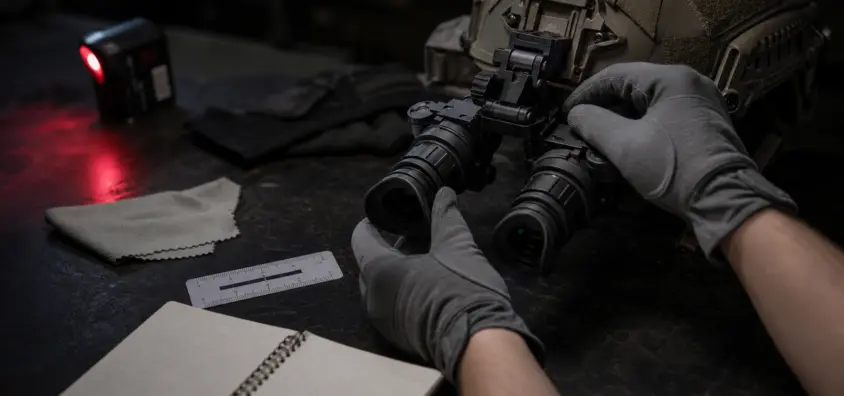
A monocular provides one picture with vision aid support and one picture without vision aid support. Dual tube night vision alignment is different: two optical channels exist and slight discrepancies in focus, position, angle, and stability are more readily apparent. Bridged PVS-14 alignment is particularly challenging as two good monoculars don’t necessarily make one good binocular.
Here are some symptoms that indicate an alignment issue
Through night vision, you can see double images or "Two Images"
Typical symptoms of night vision double vision include a feeling that the scene won’t fuse. Two versions of a tree, fence post, target stand, gate or horizon line can be shown.
Wrong IPD, eyepiece position, a focus mismatch, mount angle, and user vision can all give rise to the same grievance. However, persistent night vision goggles double image symptoms are a warning sign, and if more than one person is having the same problem, you could have a real setup or alignment problem.
Eye Strain, Headaches, Dizziness, or Nausea
The symptoms of night vision eye strain may include a pressure sensation around the eyes, a headache behind the brow, dizziness, nausea or a cross-eyed feeling. This can be due to poor image matching, glare, faulty focus, tiredness, prescription requirements or an awkward helmet position.
If symptoms start to intensify, then end the session. Avoid attempting to persevere through doubled vision, nausea, eye pain or the worsening headache. See an eye-care professional if symptoms do not go away after using it. If the same piece of equipment produces the same symptoms from user-to-user, have it tested by a competent technician. To get a more in-depth perspective on comfort, read NV Guide USA’s article on night vision eye fatigue.
Difficulty with depth perception or a "cross-eyed" sensation
There are a number of sources for night vision depth perception problems. Many monocular users have trouble with one eye aided and the other not. Dual-tube users can have trouble when two aided images are not positioned comfortably together. If the image remains split or "cross eyed" even after making setup adjustments, professional inspection is more feasible.
One user will have an issue and another will not
People have varying IPD, eye dominance, prescription requirements, facial structure, light tolerance and experience. Try to refit the device for each user before deeming the equipment faulty.
Before adjusting anything else, re-check the focus
Ensure that the Diopter is set correctly
It’s easy to rush diopter. Focus the device following the normal safe focusing procedure in the manual and adjust it one at a time. In a dual installation, configure each side for the eye with which it is intended to be used.
Program Objective Focus for the Real Viewing Distance
Night vision focus problems are common when the user focuses for one distance but judges the device at a different distance. When diagnosing PVS-14 collimation, determine the distance you are examining and set up objective focus for that distance, and then examine the image.
Ensure equal focus from both eyes
With two tube systems, both sides should be deliberately focused. Even if both channels are mechanically OK, a slightly soft left side and sharp right side can cause fatigue. This is important for any dual PVS-14 collimation checks as well.
These are the three settings you need to make: IPD, Eye Relief and Helmet Position
This is a big deal for IPD that not many new users realize
If the distance between the eyepieces is not correct, vignetting, shadows, a partial image or an unstable image may appear. Relax and set IPD. It shouldn’t feel like searching for the image.
Eye Relief, Helmet Height, and Fore/Aft Position
The device should not be positioned too close, too far, too high or too low or you may be looking at the edge of the eyepiece rather than the center. Inspect night vision helmet alignment – mount height, fore/aft position, J-arm or bridge position, and counterweight. The image should be placed where the eye naturally wants it in a good night vision helmet setup.
Never chase for alignment when the helmet is moving
Loose helmet, sloppy shroud, weak mount, weak retention or bad counterbalance can present as optical trouble. If the picture moves with each step, secure the platform before making an alignment decision.
Test each tube/monocular individually
Test Left Side Only, Then Right Side Only
Separate testing is the most thorough field test for a dual-tube or bridged system. Repeat the process using the left side alone and then the right side alone, under the same conditions.
If both together form a double image but each side alone is fine, it may be due to IPD, bridge geometry, binocular alignment or face fit. If one side seems wrong alone, then the problem can be with that device or channel.
Only swap sides if it is safe to do so considering the mount
Change monoculars or bridge configuration only if the night vision bridge mount is designed for such changes and the manufacturer’s instructions support the change. Never disassemble optics, open housings, rotate optical assemblies or attempt bench collimation at home. The relevant question is, does the problem follow one monocular, one bridge side, one eye, or both?
Compare Handheld and Helmet Mounted Viewing
Handheld viewing can de-couple the device behavior from the helmet fit. If a monocular is comfortable in hand but not on the helmet, consider helmet position, J-arm geometry, eye-relief and stability.
The next step is to inspect the Bridge, J-Arm and Mount
Bridged PVS-14s do not automatically create a perfect binocular
A bridge can be helpful, but that is still a mechanical system that connects two independent devices. Comfort is determined by weight, hinge position, monocular angle, mount quality, and helmet balance.
One of the reasons why the PVS-14 vs dual-tube night vision decision is not only an image quality debate is because of this. There are pros and cons to dedicated binoculars vs. bridged monoculars.
Loose interfaces can cause shifting images
High level check of external interfaces: bridge screws or clamps, dovetail or bayonet contact, J-arm lockup, shroud fit, helmet shell flex and accessory weight. The additional lights, recording devices, filters, battery packs and adapters all introduce variables. NV Guide USA’s night vision accessories guide can help in determining what to add to the helmet.
Your manufacturer should explicitly state whether the optical adjustment is something you can do yourself or not
User set-up is not optical user service. Shifts in focus, diopter, IPD, helmet position and external mounts are normal. If any of the following is attempted – opening a device, turning optical assemblies, adjusting internal parts – this is not considered normal user troubleshooting and is not supported. True PVS-14 collimation, binocular night vision collimation and dual PVS-14 collimation should be performed by a qualified technician unless a supported user procedure is specifically called out in your exact manual.
To check if there’s a legitimate service issue, you can follow these steps
Symptoms persist after the focus, IPD and mount fit are correct
If diopter, objective focus, IPD, eye relief, helmet position and mount stability are all corrected and the image is still split or causes severe discomfort, then the sensible next step is night vision professional service.
The problem is associated with one device, or one channel
If the same monocular/optical channel is problematic in multiple configurations, the device should be considered for evaluation.
Multiple Users See the same duplicate image
If multiple users, with distinct faces and different IPDs, experience the same double image, then the odds point towards the gear.
Problems after a drop, hard impact, water intrusion or unknown used-gear history
If a device has been dropped, hit hard, exposed to water intrusion or if it is second hand with unknown history, be careful. Do check out how to store night vision gear for basics on storage and transport.
The PVS-14 monocular eye strain is not the same as the dual tube collimation
PVS-14 eye strain often comes from monocular viewing itself: one eye sees an intensified image while the other eye sees natural darkness or ambient light. A night vision beginners guide may be necessary for beginners, along with shorter sessions and realistic expectations, and a good fit of a helmet.
Brightness matters too. If your device has manual gain, adjust the setting to minimize glare and maintain useful contrast. That is explained in more detail in the manual gain night vision guide. Manual gain can be used to alleviate brightness discomfort but will not correct wrong IPD, poor focus, loose mount or optical misalignment.
When purchasing used night vision, there are certain questions you should ask regarding collimation
Inquire about the professional assembly and/or verification of a dual-tube system, binocular housing or bridged PVS-14 pair. Inquire who performed the work, if there is any documentation.
Before purchasing expensive used gear, ask for clear terms of return as well. There are some alignment and eye strain issues that only manifest after use of the device and setting of IPD. Tube specs are important, as are the numbers in the NV Guide USA guide on night vision specs, but comfort still needs to be checked.
Never find alignment discomfort during the hunt, property check, class or night on the range. Try out in small sessions first.
A checklist to help you prepare for your night in the field
- Correctly set the diopters for each eye.
- Focus objective for the true viewing distance.
- Bring both eyes of a binocular/bridged setup into focus.
- Adjust the IPD so that both of the eyepieces are in front of your pupils.
- Check eye relief, helmet height and fore/aft mount position.
- Verify helmet fit, shroud stability, J-arm lockup and bridge stability.
- Keep image in balance on helmet so it does not bounce or slide.
- Test each side separately.
- Test both sides together for short periods prior to a lengthy session.
- Discontinue use if headache, dizziness, nausea, double vision or eye pain worsens.
- Use qualified service for suspected optical collimation or internal alignment problems.
FAQ
Is it possible to collimate night vision at home?
You can adjust normal user settings: diopter, objective focus, IPD, helmet position, eye relief, and external mount fit. However, if the manufacturer does not have an approved user procedure for your specific device, true night vision collimation should be performed by a qualified technician.
I have two PVS-14s. Is double vision normal?
If you have double vision that doesn’t go away, it’s not something to be ignored. With dual PVS-14 collimation complaints, the cause could be focus, IPD, bridge fit, helmet position, user vision or device alignment. Do safe external checks first, and if the issue persists, call in the professionals.
Will poor collimation hurt my eyes?
Don’t diagnose discomfort as a medical condition. If you experience headache, dizziness, nausea, eye pain or ongoing double vision, it’s time to stop using the device. If symptoms persist, seek advice from an eye-care specialist. If symptoms continue to occur with the use of the gear, have it checked.
Why can my friend see and I can’t in my night vision?
IPD, eye dominance, prescription requirements, facial structure, helmet fit and brightness tolerance vary among different users. Refit the device for each user before judging the gear.
Can manual gain be used to resolve night vision eye strain?
Manual gain will take away brightness discomfort but won’t take away optical misalignment, wrong IPD, poor focus or a loose mount.
Is it better to choose bridged PVS-14s or dedicated binocular night vision?
It is a matter of budget, weight, flexibility, mobility and your appreciation of an integrated binocular system. Before purchasing, read the tradeoffs in NV Guide USA’s PVS-14 vs dual-tube night vision guide.
Final Recommendation
Think of alignment as a troubleshooting procedure, not a guess. Use the following settings: focus, diopter, IPD, eye position, helmet stability, and left/right testing. At the same time, keep user adjustment limits in mind. If double vision, severe eye strain, dizziness, nausea or a cross-eyed feeling persists after basic setup checks, discontinue use of the gear and seek assistance. True night vision collimation is for the technician, and costly night vision equipment requires careful service, not risky DIY optical adjustment.
IR Illuminator Not Working With Night Vision? Beam, Battery, Focus and Compatibility Check.
Is your NV not turning on? Battery, Contacts, Mount and Tube-Safe Troubleshooting

PVS-14 Depth Perception: How to Move Safely With Monocular Night Vision