
March 31, 2026
Thermal Color Palettes Explained: White Hot, Black Hot, and Color Modes
Every thermal scope and monocular ships with multiple color palette options. Most buyers set it to White Hot, leave it there, and never revisit the setting. That’s a reasonable default — but understanding what the other palettes actually show, and when they reveal information White Hot misses, improves your ability to read thermal images quickly and accurately.
This guide explains how thermal color palettes work, what each palette mode represents, and the practical scenarios where palette selection affects detection, identification, and shot opportunity.
What a Thermal Color Palette Actually Does
A thermal sensor produces a grayscale output representing surface temperature data. Each pixel in the sensor corresponds to a temperature measurement — the sensor assigns a value from coolest to hottest in the scene. That temperature data gets mapped to a color (or grayscale) display through what’s called a pseudocolor mapping, or look-up table.
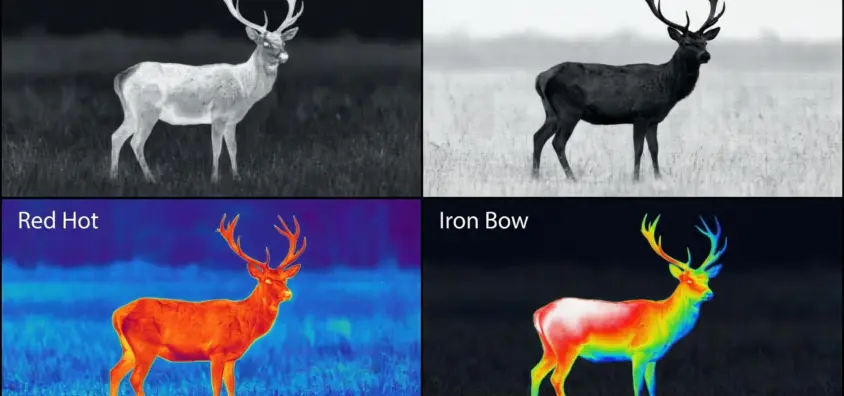
The temperature data itself doesn’t change when you switch palettes. What changes is how that data is rendered on your display. White Hot maps the hottest pixels to white and coolest to black — the most direct and intuitive representation. Black Hot inverts that. Color palettes (Red Hot, Rainbow, Iron Bow, etc.) assign colors to temperature values to create visual differentiation that sometimes improves target separation from background.
For a deeper understanding of how the sensor produces this temperature data, our guide on how thermal imaging works covers the detector and microbolometer process from sensor to image.
White Hot
White Hot is the default palette for most thermal optics users and for good reason. Hot objects appear bright white or light gray; cool objects appear dark gray or black. The resulting image closely resembles a conventional black-and-white photograph in terms of human visual processing — your eye naturally interprets bright as prominent and dark as background.
Detection advantage: In cold conditions, warm-blooded animals (deer, coyotes, hogs) appear as bright white or light gray against dark terrain. The contrast is immediate and unambiguous.
When White Hot underperforms: On warm evenings when ambient temperature approaches animal body temperature, the contrast between animal and background narrows. The animal still appears warmer than surroundings, but the differential may be subtle enough to miss at range against warm rock or sun-heated ground. This is where sensor NETD rating matters — a 25 mK sensor preserves the contrast that a 50 mK sensor loses.
Practical use: General all-purpose hunting in conditions with clear temperature differentials. Most hunters use White Hot as their primary palette and switch only when specific conditions call for it.
Black Hot
Black Hot inverts the White Hot palette — hot objects appear dark; cool objects appear light. The resulting image resembles an x-ray or photographic negative.
Why use Black Hot? In conditions where background clutter is bright in White Hot — hot rocks, sun-heated metal, warm ground — Black Hot makes warm-blooded animals appear as dark shapes against lighter backgrounds. Some users find that a dark animal silhouette against a lighter background is easier for their visual system to process quickly for identification.
Practical use case: Hunting in terrain with warm, reflective backgrounds that create clutter in White Hot mode. Desert terrain in the southwest, rocky hillsides on warm evenings, and south-facing slopes that retain solar heat are environments where Black Hot sometimes cleans up a busy thermal image.
Limitation: Inverted contrast takes adjustment. Hunters accustomed to White Hot often struggle initially to read Black Hot images quickly under pressure — the instinct to identify a bright shape as animal has to be reversed. In high-pressure shot situations, using an unfamiliar palette is a liability.
Red Hot
Red Hot maps the hottest objects in the scene to red or red-orange tones against a grayscale background. The effect is that warm-blooded targets appear in a distinct color while background terrain remains gray.
The advantage of Red Hot: Color separation. A warm deer against a cool hillside appears red on gray — the distinction between target and background is processed through color perception rather than brightness alone. Human vision is particularly sensitive to red-on-gray contrast, which is why Red Hot is popular among hunters who need quick detection rather than detailed target reading.
Limitation: Red Hot oversimplifies the thermal image. Because color rendering is applied selectively to the hottest objects, you lose the gradual temperature gradients that help you understand scene structure. A deer body appears red, but the subtle temperature variation between the deer’s chest (warmer) and extremities (cooler) disappears into uniform red. For close-range shot placement, White Hot’s grayscale gradient provides more information.
Practical use: Detection work at range — spotting entering animals across large fields, scanning a creek bottom at last light, identifying movement against complex backgrounds. Once a target is detected and you’re evaluating shot placement, switching to White Hot before shooting is common practice.
Iron Bow (Fusion)
Iron Bow is a spectrum palette that maps temperature values across a blue-to-white color range, moving through purple, red, orange, and yellow before reaching white. The result is a highly detailed representation of temperature variation across the scene.
Some manufacturers call this palette Fusion or Lava — the color progression differs slightly, but the concept is identical: multiple colors are used to represent intermediate temperatures, revealing gradients that simpler palettes compress into grayscale.
What Iron Bow reveals: Temperature gradients that white and black hot flatten. A deer’s body in Iron Bow shows distinct color zones — blue-purple in hooves and lower legs, progressing through red at the torso to white at exhaled breath and eye area. This detail is irrelevant for basic detection but can assist in confirmation of animal type and orientation when the thermal image is ambiguous.
Limitation: Iron Bow creates visually complex images. The multiple colors in the scene demand more interpretation than simple white-hot or black-hot, and under time pressure, complex images slow recognition. Iron Bow is best used for deliberate scanning and target evaluation, not reaction-time identification. For more on how NETD rating affects the thermal gradients that Iron Bow displays, see NETD explained.
Rainbow and Other Multi-Color Palettes
Some thermal scopes offer Rainbow, Sepia, or additional multi-color mappings beyond the standard options above. These palettes serve specific niche applications.
Rainbow: Full spectrum mapping of temperature data from blue (cool) through green, yellow, orange, to red (hot). Produces the most visually complex output and is primarily used in engineering and medical thermal applications where precise temperature differentiation across a scene is the goal. Hunting applications for Rainbow are minimal — the visual complexity slows field identification.
Sepia: A warm-tone grayscale variant that some users find easier on the eye during extended scanning sessions. Functionally similar to White Hot with a warmer color cast. Preference-driven rather than performance-driven.
Graded Color Modes: Some manufacturers (AGM, Pulsar) offer intermediate palettes that combine grayscale backgrounds with colored target highlighting. These bridge the gap between information-rich White Hot grayscale and the quick-detection advantage of Red Hot coloring.
Palette Choice in Practice
The common pattern among experienced thermal hunters is:
- Scanning: White Hot for initial scene reading. Most hunters find it provides the fastest overall detection and the most intuitive image.
- Confirmation on complex backgrounds: Switch to Red Hot or Black Hot when White Hot creates clutter that slows identification.
- Shot placement: Return to White Hot for the detailed grayscale rendering that informs precise hold.
Palette switching during active hunting requires familiarity with your scope’s control layout. The button or dial that cycles palettes should be operable without breaking your shooting position. Practice palette switching before hunting — this is not a skill to learn in the field.
Scene Conditions and Palette Performance
Cold Winter Conditions (Ambient below 32°F)
Thermal contrast between warm-blooded animals and cold backgrounds is at its maximum. Any palette performs well. White Hot is standard. The high temperature differential means even 50 mK sensors deliver clean, distinct animal silhouettes.
Moderate Conditions (Ambient 40-65°F)
Temperature differentials remain clear for most animals. White Hot is standard operating mode. Transition to Black Hot or Red Hot only if background clutter from warm surfaces creates confusion.
Warm Conditions (Ambient 65-85°F)
This is where palette selection becomes operationally relevant. As ambient temperature rises, animal-to-background temperature differentials narrow. Red Hot can maintain detectable contrast when White Hot produces a nearly-uniform gray image. Higher NETD-rated sensors (above 40 mK) struggle more significantly in this temperature range.
Hot Weather (Ambient above 85°F)
Challenging conditions for all thermal imaging. Ground, rocks, and vegetation have absorbed solar heat and radiate at near-body-temperature levels. Detection of warm-blooded animals becomes difficult. No palette fully compensates for inadequate sensor NETD in these conditions — this is a sensor specification problem, not a palette problem. For hunting applications in consistently warm climates, investing in a 25-35 mK sensor is more impactful than any palette setting.
The Role of Palettes vs. Sensor Quality
A critical point: palette selection is a display processing choice. It cannot improve the underlying thermal data produced by the sensor. No palette compensates for a sensor with inadequate NETD for your conditions. The relationship between sensor quality and palette utility is that better sensors give you more temperature gradient data to work with — making the advanced palettes like Iron Bow more informative because the underlying data has finer resolution.
For a hunter choosing between a high-quality 384×288 sensor at 35 mK and a lower-cost 320×240 at 50 mK, the palette options on the better sensor produce more useful differentiation. This is related to how thermal scopes compare to night vision rifle scopes overall — sensor quality underlies both platform evaluations.
Default Settings and Field Protocols
Most thermal scope manufacturers default to White Hot on power-up, regardless of the last-used palette setting. Verify whether your scope retains palette selection through power cycles or resets to default — a few seconds after powering on at a stand to confirm your palette setting is worthwhile.
Some scopes allow a favorite palette assignment that powers on to your preferred mode. This feature is useful when you’ve determined that Black Hot or Red Hot is your primary operating palette for a specific hunting environment.
Summary: Which Palette to Use and When
| Condition | Recommended Palette | Why |
|---|---|---|
| Cold weather, any terrain | White Hot | Maximum contrast, simplest interpretation |
| Warm weather, warm backgrounds | Red Hot or Black Hot | Maintains target/background contrast when White Hot loses it |
| Deliberate scanning for scene reading | Iron Bow | Reveals temperature gradients for better identification |
| Extended scanning, low fatigue | White Hot or Sepia | Simplest images require least processing to interpret |
| Fast-moving targets, reaction shots | White Hot | Fastest recognition under time pressure |
Palette selection is a tool for specific conditions. Most hunters who own the skill return to White Hot as their default and apply alternatives when the specific condition demands it. Learning to read all available palettes quickly, under realistic conditions, before hunting season is the correct preparation approach.
IR Illuminator Not Working With Night Vision? Beam, Battery, Focus and Compatibility Check.
Is your NV not turning on? Battery, Contacts, Mount and Tube-Safe Troubleshooting
Night Vision Collimation and Alignment: Fix Double Vision, Eye Strain and Dual-Tube Setup Issues