
April 27, 2026
Thermal NUC Explained: Why Your Scope Clicks and What It Does
If you have spent any time behind a thermal scope, you already know the sound. A sharp mechanical click, a brief blackout of the display, and then the image comes back looking cleaner than before. That is NUC — Non-Uniformity Correction — doing its job. Most hunters learn to live with it. Fewer understand what is actually happening inside the scope, why it matters for image quality, and how to adjust NUC settings so it interferes with your hunt as little as possible.
This article breaks down the science behind NUC, explains the physical mechanism that produces that click, and gives practical advice on configuring NUC for different hunting situations.
What Is NUC (Non-Uniformity Correction)?
NUC stands for Non-Uniformity Correction. It is a calibration process that every thermal scope with an uncooled microbolometer sensor performs to maintain a clean, accurate image. Without NUC, the thermal picture degrades over time — you start seeing fixed-pattern noise, ghosting from previous scenes, and uneven brightness across the display.
The core idea is straightforward: the scope needs a uniform reference temperature to recalibrate what each pixel in the sensor array “sees” as zero signal. By blocking the sensor from the outside scene and exposing it to a known, even temperature surface (an internal shutter), the processor can measure and subtract the error from every pixel. The result is a clean baseline, and the scope can then accurately render the thermal differences in front of you again.
This is not a design flaw. It is a fundamental requirement of how thermal imaging works with uncooled sensors. Every manufacturer — from entry-level to premium — implements some form of NUC.
Why Thermal Sensors Need Calibration
The sensor at the heart of most thermal scopes is an uncooled microbolometer. Unlike cooled thermal systems used in military applications (which maintain the detector at cryogenic temperatures), uncooled sensors operate at ambient temperature. This makes them affordable, compact, and practical for handheld and weapon-mounted devices. But it also makes them drift.
Here is what causes that drift:
- Self-heating. The sensor array itself generates heat during operation. Over time, this changes the baseline temperature of individual pixels unevenly.
- Ambient temperature shifts. As you move from a warm truck cab into cold night air, or as the night drops 15 degrees over a few hours, the sensor housing and optics change temperature at different rates.
- Pixel-to-pixel variation. No microbolometer array is perfectly uniform. Each pixel has a slightly different response curve, and these curves shift independently as conditions change.
The visible symptoms of an uncalibrated sensor include vertical stripes or column noise, a “veil” of static that does not go away, and hot spots from previous scenes that linger as ghost images. The longer you go between NUC cycles, the worse these artifacts get.
This is also related to the sensor’s NETD (Noise Equivalent Temperature Difference) rating. A lower NETD value means the sensor can distinguish smaller temperature differences — but only if it is properly calibrated. You can read more about this relationship in our NETD explained article.
The Click Sound: What Is Physically Happening
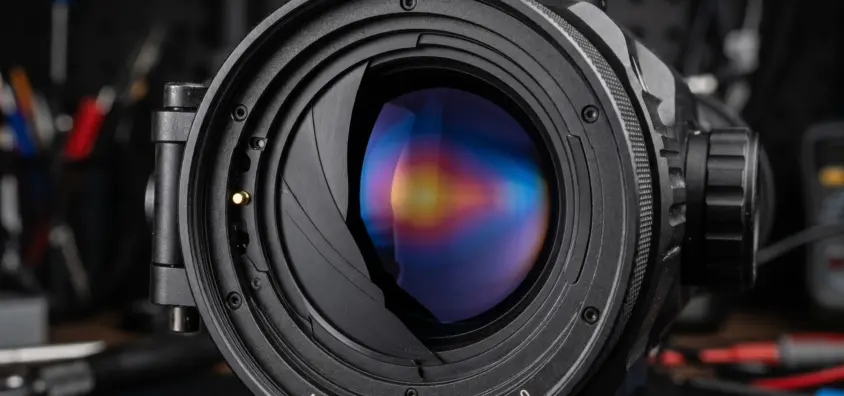
That audible click comes from a mechanical shutter inside the scope. It is a thin, flat piece of material — usually a coated metal or composite blade — positioned between the lens assembly and the sensor. When NUC triggers, this shutter swings closed across the sensor’s field of view for a fraction of a second.
While the shutter is closed, the sensor sees only the shutter surface, which has a uniform and known temperature. The processor reads every pixel’s output against this reference, calculates the offset error for each pixel, and stores a correction table. When the shutter opens again, the processor applies these corrections in real time, and the thermal image is recalibrated.
The whole process typically takes 0.5 to 1.5 seconds depending on the scope. During that time, the display either freezes the last frame or goes black — you are effectively blind for that brief window. Hence the importance of managing when and how often NUC occurs.
The shutter mechanism is one of the few moving parts in a thermal scope, and it is also one of the reasons some manufacturers specify a maximum number of NUC cycles in the device’s lifespan rating. That said, in practice, the shutter is one of the more durable components and rarely fails before other parts of the scope.
NUC Modes: Manual, Auto, and External
Most thermal scopes offer at least two NUC modes, and many add a third. Understanding the differences helps you pick the right one for the situation.
Manual NUC
You trigger NUC yourself, usually by pressing a dedicated button or a specific key combination. The advantage is full control — you choose when the brief blackout happens, ideally during a moment when no shot opportunity is imminent. The disadvantage is that you have to remember to do it, and the image quality will degrade between corrections.
Auto NUC
The scope performs NUC automatically based on a time interval you set (every 30 seconds, 1 minute, 2 minutes, etc.) or based on internal temperature sensors detecting a significant drift. Auto NUC is convenient but can trigger at the worst possible moment — right as a hog steps into your field of view. Some modern scopes attempt “smart” auto NUC that factors in scene change detection, but in practice, any automatic system can surprise you.
External (Shutterless / Software) NUC
Some scopes — particularly higher-end models — offer a shutterless NUC mode that relies on software algorithms instead of a physical shutter. The processor analyzes the scene continuously and applies correction mathematically, using the scene itself as a reference. This eliminates the click and the display blackout entirely. The trade-off is that software NUC is generally less thorough than a physical shutter calibration, and some fixed-pattern noise may remain visible, especially in low-contrast scenes. Many scopes blend both approaches: using software correction between physical NUC cycles to extend the interval.
How NUC Interval Affects Hunting
The NUC interval is a setting most hunters set once and forget. That is a mistake. The right interval depends heavily on what you are doing.
If you are sitting in a blind watching a feeder at 50 yards, a NUC cycle every 60 to 120 seconds is fine. The brief blackout is a minor inconvenience, and the image stays clean throughout your session. You can even use manual NUC and trigger it during slow periods.
If you are still-hunting or scanning while walking, you need a clean image more frequently because your scene is constantly changing. Auto NUC every 30 to 60 seconds works better here. The downside is more frequent blackouts, but since you are moving anyway, the interruptions are less costly.
The real problem arises during active tracking. You have eyes on an animal, it is moving, and you are waiting for a clear shot. A NUC cycle at that moment means losing 0.5 to 1.5 seconds of visual contact. At night, with no ambient light to fall back on, that can mean losing the animal entirely. This is where manual NUC shines — you keep control of when the calibration happens.
Some hunters develop a habit of triggering manual NUC right after a shot or right after scanning a new area, so the calibration happens during natural pauses rather than at random.
Best NUC Settings for Different Scenarios
Here is a practical guide to NUC settings based on common hunting situations.
| Scenario | Recommended Mode | Interval | Why |
|---|---|---|---|
| Static blind / stand hunting | Auto | 60–120 seconds | Long pauses between action; brief blackout is not costly |
| Still-hunting / walking | Auto | 30–60 seconds | Scene changes frequently; need clean image often |
| Active tracking (animal in sight) | Manual | Trigger during pauses | Prevents blackout during critical moments |
| Extreme temperature changes (truck to field) | Manual | Trigger 2–3 times in first 10 minutes | Sensor drifts fast during rapid ambient shifts; extra calibration helps |
| Long-range observation (200+ yards) | Auto or Manual | 60 seconds / as needed | Low-contrast targets at distance require a clean image; shutterless mode helps if available |
One more thing: when you first turn on a thermal scope, let it warm up for at least 30 seconds before your first NUC. The sensor needs time to stabilize thermally. If you NUC too early, the calibration will be off and you will need another cycle shortly after.
Does NUC Quality Vary Between Budget and Premium Scopes?
Yes, and the differences are noticeable in several ways.
Shutter speed. Premium scopes tend to have faster shutters and quicker NUC cycles. A high-end scope might complete NUC in 0.3 seconds where a budget model takes 1.5 seconds. That difference matters when you are tracking moving game.
Correction quality. The processor and algorithms behind NUC matter as much as the shutter. Premium scopes use more sophisticated calibration routines that produce cleaner uniformity. Budget scopes may leave faint column noise or slight vignetting after NUC, especially near the edges of the display.
Software NUC. The shutterless or hybrid approaches that reduce or eliminate the physical click are more common in mid-range and premium scopes. Budget models typically rely solely on a physical shutter, meaning you always get the click and the blackout.
Shutter durability. The mechanical shutter is rated for a certain number of cycles. Premium scopes often use higher-quality actuators and materials. That said, even budget shutters are typically rated for hundreds of thousands of cycles — far more than most hunters will ever trigger in the device’s lifetime.
The sensor resolution also plays a role here. Higher-resolution sensors with smaller pixels tend to show non-uniformity more visibly, which means NUC quality has a bigger impact on the final image. A well-implemented NUC on a 640 sensor is more critical than on a 320 sensor, because there are more pixels to correct and smaller errors become visible at higher magnification.
Frequently Asked Questions
Can I disable NUC entirely?
No. Without NUC, the thermal image degrades within minutes to the point of being unusable. Even scopes marketed as “shutterless” still perform calibration — they just do it with software algorithms instead of a mechanical shutter. The calibration process itself is not optional for uncooled thermal sensors.
Why does my scope NUC more often when it is cold outside?
Cold ambient temperatures cause faster thermal drift in the sensor and optics. The housing cools at a different rate than the internal electronics, creating temperature gradients that shift pixel baselines more rapidly. Most auto-NUC systems detect this drift through internal temperature sensors and trigger calibration more frequently to compensate.
Does NUC affect battery life?
Marginally. The shutter actuator draws a small amount of power each cycle, and the processor works harder during calibration. But the impact on total battery life is minimal — typically less than a few percent difference even with frequent NUC intervals. Battery drain from the display and the sensor itself is orders of magnitude higher.
Is the click sound the same on all thermal scopes?
No. The loudness and character of the click depend on the shutter design, the housing materials, and whether the manufacturer includes any sound dampening. Some premium scopes have noticeably quieter shutters. In most hunting situations, the click is not loud enough to spook game at any meaningful distance, but it can be noticeable in very quiet environments at close range.
IR Illuminator Not Working With Night Vision? Beam, Battery, Focus and Compatibility Check.
Is your NV not turning on? Battery, Contacts, Mount and Tube-Safe Troubleshooting
Night Vision Collimation and Alignment: Fix Double Vision, Eye Strain and Dual-Tube Setup Issues