
July 14, 2026
PVS-14 Brightness Control Guide Manual Gain Night Vision
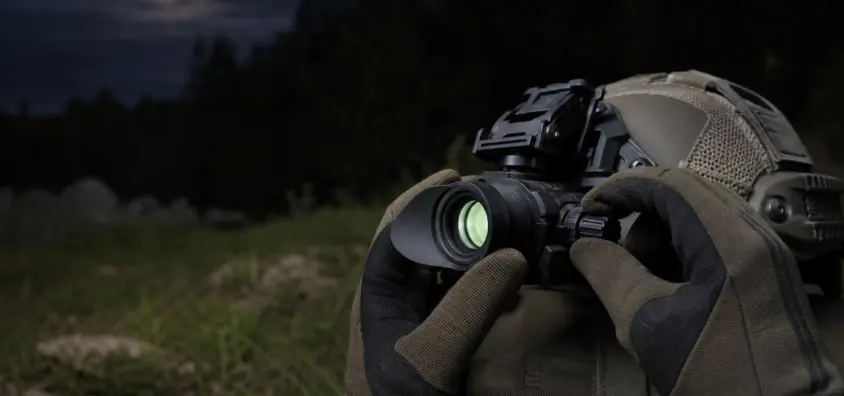
In manual gain mode, PVS-14 night vision systems offer a useful brightness control by enabling the operator to adjust brightness without compromising detail.
One of those features is the manual gain night vision, which seems so straightforward that you don’t need to think much about it until you start using the PVS-14 outdoors. Many users crank up the gain to max as they think that the brighter it is the more it will perform. When it does, the picture is grainy, washed out, faded, or boring, and they begin to question if the tube is broken, the focus is off or if the system is going bad.
Manual gain is not the focus. It is not infrared illuminating. It’s not brightness of a digital screen. Bright lights can still affect your tube. Gain control permits you to adjust the brightness of the picture seen on an analog night vision device so that it is not too faint to see, but not so bright that it washes out the contrast, exaggerates noise, and/or tires the eyes of the viewer.
While this guide is intended for PVS-14 manual gain use, similar field logic is applicable to many analog systems that use user adjustable gain. Always consult your device manual for the exact housing and tube.
What Manual Gain Means on Night Vision
Manual Gain is the night vision brightness control preset by the user, on compatible analog Image Intensified devices. The night vision manual gain knob is a simple way of adjusting the output of the image you are viewing either up or down within the range of the night vision device.
This lens is not being sharpened, and no light is being added or a digital display changed. This is because you are altering the brightness that the intensified image is projected to the eye. That’s important because common field difficulties are commonly pointed at the wrong control:
If the image is soft, set the diopter and the objective focus before adjusting the gain. More gain = more noise, and if the scene is all but devoid of usable light, this may make the noise more noticeable. Reduce gain if the picture is too bright for the moon, snow or light spill from a city. If a red dot or reticle appears aggressive in the tube, then try dimming the reticle as well as adjusting the gain.
Consider night vision gain control as a comfort/reliability control. It assists you in adjusting the picture to the surroundings and your eyes. It shouldn’t be a substitute for the quality of the tube, correct focus, proper helmet alignment, or smart use of illumination. To understand the larger image of S/N ratio, refer to NV Guide USA’s how-to-read-night-vision-specs-the-numbers-that-actually-matter post.
The difference among Manual Gain, Auto-Gating and Automatic Brightness Control.
Sometimes manual gain, auto-gating, and automatic brightness control night vision options are mentioned together, but they aren’t necessarily the same feature.
What auto-gating does
Auto-gating is a characteristic of tubes and power supplies to help control rapidly changing light situations. The image is more stable and the tube is better managed under challenging lighting with auto-gated tubes that can respond quickly to a change in brightness or color of the light. This doesn’t make it invincible, though, and avoid unnecessary use of headlights, weapon lights, lasers, and other bright lights. To learn more, check out NV Guide USA’s article about auto-gated tubes in night vision.
What automatic brightness control does
Automatic Brightness Control decreases output in higher lighting conditions. The user might not be rotating a knob, but the system is attempting to keep the image within a range that is useable.
This is where manual gain vs auto gain night vision comparisons become fuzzy. A few devices provide the user with a manual gain knob. A few are more automatic. A few digital devices have screen brightness controls which aren’t analogous to the analog night vision tube gain.
What manual gain does the user get?
Manual gain provides direct image brightness control. This is helpful when the tube is able to get technically bright enough, but not comfortable or readable enough for the task.
PVS-14 brightness adjustment is good for glare like harshness, tube noise, one eye imbalance when using monocularly, passive aiming by using the red dot and night vision eye fatigue. Manual gain does not necessarily imply better performance. It indicates that the user has another way to ensure that the image meets the job.
When Turning Gain Down Helps
One of the beginner’s errors is keeping the gain turned up all night. That will work in some circumstances, but it’s a bad default.
Full moon, snow, urban light and reflective terrain.
In bright light, the maximum gain setting can cause the picture to become over exposed. This look is flat and harsh when there is a full moon in open areas, snow, white dirt, concrete, gravel, water, or white buildings.
In those circumstances, if your night vision is too bright, reduce gain before assuming something is amiss. Grass ruts, brush and fence lines and shadows might appear with more texture in a slightly dimmer image. It’s not the brightest picture. The aim is the most readable image.
Monocular use with one unaided eye.
Manual gain is important to PVS-14 users because the visual task involved in using a monocular is split. In one eye an amplified image is observed. The other eye is able to see natural light, car lights, house lights, stars, moonlight or barely anything.
When you look at a bright image with the aided eye, your brain has to try to understand that you’re also seeing a much darker image of reality. Decreasing the gain can increase the comfort of monocular night vision and decrease visual conflict. NV Guide USA addresses the issue as a whole in the article about dark adaptation and night vision eye fatigue.
Passive aiming and bright reticles.
A red dot viewed through night vision can appear more brightly than you think. Reducing gain can improve the overall picture, but do not compensate for a very bright dot only by decreasing gain.
The brightness of the reticle is still to be set correctly. If the dot blooms, smears or dominates the scene, decrease the optic brightness (if permitted by the optic).
If More Gain is Not More Useful Detail, then what is useful detail?
After a certain amount of gain, a brighter image will not necessarily be a better image; in the case of night vision tubes (NVTs), it will be brighter but not better. This is when users begin to complain of "noise" in the night vision image.
Analog night vision is an enhancement of available light. If the scene is not too rich in useful information, increasing the gain can also increase scintillation and grain and tube noise. In very low-light, night vision scintillation (sparkling or crawling) can appear. More gain can also cause blooming, halos and bright objects to be more distracting.
I’d prefer a little duller (but higher contrast) picture, as opposed to a really bright picture that obscures the texture of the terrain using noise and glare. If reducing gain does not make the scene bright enough, it may be a problem other than gain. Maybe you need to focus more, or use different positions, or realistic expectations, or IR illumination.
How to Set Manual Gain in the Field
When asked how to adjust night vision gain, I provide them with a sequence, not a magic number. Night vision gain settings are a function of tube, housing, ambient light, terrain, weather, eyes and task.
Start lower than maximum
Never start with the knob at full output. Begin with low to medium. Examine terrain detail and movement in safe low light and adjust gain up until the task can be accomplished without strain.
When transitioning from timber to a moonlit field, reduce gain and reassess. When moving from open field to dark woods, gain might need to be increased, but only if necessary. If you still don’t get detail but the image is getting noisier, then it’s likely that more gain isn’t the answer.
Check focus before blaming gain
An out of focus PVS-14 can make a good tube look bad. Adjust your diopter and then adjust the objective for the distance you are looking at. Then, gain adjustments.
If you turn the settings around you might be looking for brightness where the issue was blur. Soft image at higher gain is still a soft image. NV Guide USA’s guide on how to focus night vision explains the order in more detail.
Use IR illumination only when the scene requires illumination.
Without useful light, gain cannot create detail. An IR illuminator may be appropriate in certain environments when the illumination is low, such as when in a dark structure, under heavy canopy, in overcast no-moon conditions, or looking into a shadowed area with very little signal.
Use IR intelligently. It can enhance the picture, but it also can bounce off objects nearby, wash out foreground details, or give away your location to other night vision users. More info on NV Guide USA’s IR illuminator guide.
The order of the field is as follows:
- Ensure device is safely powered and uncapped in the proper environment.
- Diopter and objective focus.
- Start gain LOW to MEDIUM.
- Ramp up till the scene can be read.
- If the image is harsh, noisy, or tiring, decrease the gain.
- Use IR only when there is no available light.
- Review settings when environment changes.
Manual gain on PVS-14, binoculars, and budget devices.
Not all night vision devices offer the same user experience. It is at this point that the buyers should take a breath and read the actual device description.
Why PVS-14 users care about manual gain
The PVS-14 has a frequent application as a monocular night vision and brightness comfort is more apparent when using monoculars. You’re sometimes working with one eye wide open and the other eye closed, sometimes with a helmet, sometimes with a handheld device and sometimes with an optical device. This flexibility is where PVS-14 manual gain comes into the equation.
The reason why some binocular housing and/or digital devices act differently.
The one-eye imbalance may be reduced somewhat for binocular night vision as both eyes get an enhanced image. Another type of night vision is digital: the brightness of the digital screen is not analogous to the gain of the analog image intensifier tube. Thermal devices are yet another. If you’re still figuring out what devices you should use, NV Guide USA’s night vision beginners guide is a better place to start.
Is it worthwhile for beginners to upgrade to manual gain?
Manual gain is helpful, particularly with a PVS-14 type monocular. I like having it. However, I would never consider it a replacement for tube quality, warranty service, solid mounting, proper focusing, or safe operating practices. It helps you adjust to mixed light and lessen fatigue, but it is not a cure for a low performing tube to become a high performing tube.
The following are common manual gain pitfalls:
The majority of manual gain issues are due to the maximum gain being treated as a set and forget value.
Running maximum gain all night!
In dark lighting, full gain might be needed, but should not be your automatic setting. In brighter settings, it can flatten contrast, add harshness and make the image more fatiguing.
This is a frequent mistake that can lead to confusion for the student.
If the image is poor, don’t spin the gain knob right away. Check focus first. Test to see if the objective cap, sacrificial lens, iris, accessory, or helmet alignment has an influence. Gain can’t compensate for a poor focus or poor alignment of an optic.
Gain should not be used to compensate for an overly bright reticle.
When it’s possible, decrease optic brightness if a red dot is too bright under night vision. If the scene can be improved by reducing the gain, it should be done, but it should not be the only tool. Heavy blooming reticle can obscure details of target and make passive aiming sloppy.
Anticipating that manual gain will save the tube from all bright lights
Manual gain is not a bright light protection. Auto-gating and automatic brightness behavior may be helpful in the management of some conditions; nonetheless, safe habits are important. Try not to get unnecessarily close to strong light sources and read the instructions for the equipment.
The comfort difference of the phosphors is not considered.
Others prefer white phosphor. Others are happy with green phosphor. The phosphor colour can have an influence on the perceived comfort, but cannot be a replacement for correct gain settings. If the topic is of interest, check out NV Guide USA’s white phosphor vs green phosphor night vision guide.
Quick Field Checklist
It can be used prior to a hunt, range session, property check or train night:
- Make sure the diopter and objective focus is made before gain is judged.
- Start gain low to medium, NOT maxed.
- Only increase gain until terrain detail, movement and obstacles are readable.
- Decrease gain if image is harsh, washed out, noisy, or tiring.
- Re-check gain when transitioning from woods to fields to snow to urban light to vehicles to moonlight.
- Don’t force gain to compensate for bright red dots and reticles.
- Do not use IR illumination as reflex — it should be used when there is no usable illumination.
- Manual gain should not be used as the protection for the tubes against intense bright objects.
Bottom Line
Manual gain night vision isn’t just a spec-sheet option. It is one of the PVS-14’s controls which makes it easier to live with in real life.
Brightness adjustment is not about getting the most out of PVS-14, it is about readability. Use gain to bring up the image when necessary. Reduce to a lower setting if it is too bright on the moonlit night and if you are in a snowy landscape, the bright terrain or the bright reticle. Test for focus before faulting gain! Only use IR when the scene is really devoid of usable light. Separate bright light safety from comfort settings.
The best night vision gain settings are those which allow you to read the terrain, see movement, not squint your eyes, and not struggle using the NVG. With that knowledge the gain knob is no longer a mystery, but rather what it should be: a field control.
IR Illuminator Not Working With Night Vision? Beam, Battery, Focus and Compatibility Check.
Is your NV not turning on? Battery, Contacts, Mount and Tube-Safe Troubleshooting
Night Vision Collimation and Alignment: Fix Double Vision, Eye Strain and Dual-Tube Setup Issues