
June 24, 2026
Thermal Scope Won’t Turn On or Keeps Shutting Off: Field Troubleshooting Guide
A thermal scope that functions flawlessly on the bench can actually fall short at the worst possible moment: at a hog feeder, at a cold coyote stand, after firing one shot or when recording begins. There are instances when the issue is a bad battery. It can be a dirty contact, a loose USB-C cable, a firmware freeze, or a power setting that hasn’t been thoroughly tested with actual hunting movement.
The important thing is to diagnose in the right order. Don’t automatically blame the optic as the cause of the problem. Don’t begin to concoct reset codes or experiment with batteries of any kind, either. Thermal scopes are electronic rifle optics and power systems vary between models. Not all batteries are created equal: internal batteries, removable battery packs, CR123A cells, proprietary packs, USB-C power banks, and firmware tools aren’t all the same.
This guide is a sequence of troubleshooting steps to consider in the field when a thermal scope won’t turn on, won’t stay on, or will shut off under circumstances that are difficult to replicate at home.
The Short Version
Handle the rifle safely before troubleshooting anything mounted on the rifle. Always keep your finger off the trigger, unload and check clear before performing hands-on inspections when conditions permit, never work behind a loaded rifle while looking at buttons, caps, or cables, and always point your muzzle in a safe direction.
Do this in this order:
- Check battery with the proper charger or charging method.
- Test a battery that is known to work, not a battery that is full on the charger.
- Replace the removable battery, battery tray, battery cap or battery latch.
- Make sure the battery cap, battery door, spring or battery contact plate is completely closed.
- Ensure that the battery type and voltage are the same as in the optic manual.
- Check for dirt, moisture, corrosion, bent tabs or insufficient spring pressure on battery contacts.
- Before testing, warm cold batteries in a safe pocket, but don’t charge frozen batteries.
- Before a hunt, test the thermal scope USB-C power cable or power bank when moving.
- During runtime testing turn off Wi-Fi, recording, high brightness, and app connection.
- For repeated recoil shutdowns, black screen following an update, water leaks, swollen batteries and charging problems, treat as support level issues.
The aim is to manipulate just one variable. Switching the battery, changing the cable, updating the firmware, remounting the scope and adjusting the settings in one hour can make it impossible to determine what caused the problem.
First, Identify the Failure Pattern
Clear symptom = time saved. My thermal scope has battery issues is too general. Attempt to specify the precise failure.
The scope is completely dead
If a scope is totally dead, there will be no logo, charging symbol, menu or standby light or screen glow. This can be due to a depleted battery, a battery that is not providing power, a power button that is stuck or contacts that are dirty, water in the battery compartment, or a battery charging system failure, or electronics failure.
Always do the less invasive checks first: charge the battery as prescribed in the manual, use a known working battery, check the battery contacts and make sure the battery is installed the correct way. If a thermal scope won’t start after these procedures, do not force caps, aggressively scrape contacts or use unsupported chargers.
The scope will only turn on while it is plugged in.
A thermal scope that only works when plugged in usually points toward the battery path: internal battery, removable battery, battery contacts, battery management circuit, or battery seating. It may also occur if the internal battery has been discharged too far or if the battery has lost its ability to hold voltage.
If external power is permitted as per the manual, test using the recommended power source with the power cord. Then retest with the battery in place (either internal or removable). If the scope runs normally on external power but fails immediately when unplugged, note this behavior for dealer or manufacturer support.
The scope will turn off after recoil or movement.
A thermal scope will shut down after the shot has been fired when power is lost for a fraction of a second. It can be due to a loose battery cap, inadequate spring pressure, a removable battery moving, or an external cable disconnecting. It can also be a mounting or movement problem in the rifle that only occurs when the gun is on recoil, UTV or bumped on a stand rail.
Unload the rifle before close inspection. Never diagnose a cap, cable or battery door with the rifle loaded.
The scope dies faster than expected
A short runtime isn’t necessarily a bad thing. The advertised battery life may be reduced under extreme conditions such as cold weather, video recording, using Wi-Fi, having the display brightness set high, using the laser rangefinder, using the menu frequently, and constantly scanning.
The runtime test should be controlled and fair. Utilize a known good full battery, normal temp, no Wi-Fi, no recording, moderate brightness, and a clear start time. Then test that and compare to a second test on your actual hunting rig.
Please read NV Guide USA’s battery planning guide separately for more in-depth planning for battery life, internal vs removable batteries, power banks and cold weather.
Screen freezes, remains black or buttons do not respond.
A thermal scope black screen may be a power problem, it might be a freeze on start-up, it could be a firmware issue, it could be a display failure, or it could be a temporary software freeze. This is exacerbated by low battery as the processor, display and sensor may lack stable power at start-up.
A black display or a frozen display is not the same as a blurred image, focus problems or bad palette. Focus and image adjustment will not correct true power failures. If the optic powers on but the image is bad, instead apply image-specific troubleshooting, such as NV Guide USA’s thermal scope image quality troubleshooting.
If you’re having issues with the optic, check the Simple Power Basics first.
A large number of field failures are due to boring causes. This is great news as boring causes can be corrected.
Battery is charged and not providing power
Charger light or app percentage does not indicate if the battery can supply consistent power while loaded. A weak pack can show full charge and then dip once the scope powers up the sensor, display and processor.
A known good battery (from the same model system) is the best test. If the scope works fine with that pack, the first battery might be worn, damaged or too cold or not charging correctly.
With an internal battery, a thermal scope may exhibit this behavior: it charges to full capacity, then uses the battery for a short while, after which it drains the battery rapidly or simply stops working. It’s not the same as the normal battery consumption in a long night hunt.
Removable battery is not fully positioned
A thermal scope removable battery may look installed while still sitting a little short of its contact point. This is common due to the use of gloves, darkness, cold fingers, and rushed checks of trucks.
Take out the battery, check the orientation and put it back in carefully. Pay attention to the latch, cap or stop point necessary for that design. Do not force it. If it does not seat itself, inspect for dirt, damage to the rails, swelling of the battery casing or any obstructions in the compartment.
The battery cap/latch or contact is not completely closed.
A cap can be threaded one turn short. Latch may appear closed but not locked. If the cap is not tight, it can cause a loss of pressure on the contact. When subjected to recoil, that little gap turns into a power failure.
The situation is particularly critical when a thermal scope powers off only after walking, driving in a vehicle or shooting. Mentally note the cap position and test again to assess if a change in the symptom occurs.
Wrong battery type / voltage setting
Certain optics have proprietary rechargeable packs. Some are running on CR123A batteries. Some are capable of accepting external USB-C input. Some have certain voltage or power requirements that are to be adhered to.
Never presume a battery will fit in a battery compartment. Don’t assume that all the thermal scope’s USB-C power ports are like a phone charger. Always match the optic manual for battery chemistry, voltage, current, polarity, external power behavior and charging instructions.
Bent, wet, dirty or corroded contacts.
Thermal scope battery contacts require clean metal-to-metal contact. Intermittent power can be caused by dust, oil, corrosion, condensation, battery leakage, or a bent contact tab.
Use a light to inspect. Check for corrosion on battery terminals (green or white), fouled cap threads, moisture, and collapsed springs. Moisture can accumulate in hard to see areas when the optic has been exposed to rain, snow, a wet truck bed or a warm cabin following freezing temperatures.
Do not use any harsh cleaning techniques that are not suitable for the manual. Don’t use excessive scraping, solvents or blasting with compressed air in enclosed spaces unless recommended by the manufacturer. More general maintenance guidelines are contained in NV Guide USA’s overview of cleaning and maintaining a thermal scope.
Cold Weather Can Make a Good Battery Look Bad
One of the most frequent causes for a thermal scope failing in cold weather, although they did fine at home, is because it was too cold.
The reason for lithium batteries to lose useable battery life in colder weather.
Batteries rely on chemical reactions. Those reactions are slowed by colder temperatures and it decreases usable output. The battery may still contain energy but not be capable of supplying enough voltage simultaneously for the thermal sensor, processor, display, Wi-Fi and recorder.
This is why a cold weather battery problem with a thermal scope may seem to happen all of a sudden. The scope comes on, the temperature drops, the recording starts or the hunter turns up the brightness, and the scope turns off prematurely.
Keep Spare Batteries Warm Without Hazardous Charging Practices
Carry spare batteries in an inside pocket where body heat can help. Employ protective cases to prevent terminals from coming into contact with keys, calls, ammunition, or metal hardware. Rotate batteries so they are not completely empty.
Never heat batteries with open flame, vehicle vents at high heat or other methods that might harm the battery cells. The aim is to get it moderately warm, not hot.
Never charge a battery that is frozen.
Never charge battery when it is frozen. If a battery has been exposed to freezing temperatures, warm it in accord with the manufacturer’s instructions before charging. It is not safe to charge a damaged or frozen lithium battery.
If the manual specifies that the scope should be brought to a specific temperature range before charging the battery, do so if the scope has its own battery. Discontinue use if battery is swollen, leaking, excessively warm or damaged.
When it is expected vs when it isn’t
It is normal to have shorter runtime during cold weather. If it shuts down right away and after a full warm battery, it’s more suspicious. So is a scope that operates just fine in mild temperatures and after a few minutes in modest cold it dies; but a second identical battery operates well.
Record the temperature, battery age, battery type, method of charging, battery run time, settings, and the cause of failure: recording time, Wi-Fi, standby wakeup or recoil.
There Can Be Issues With External Power Banks and USB-C Cables.
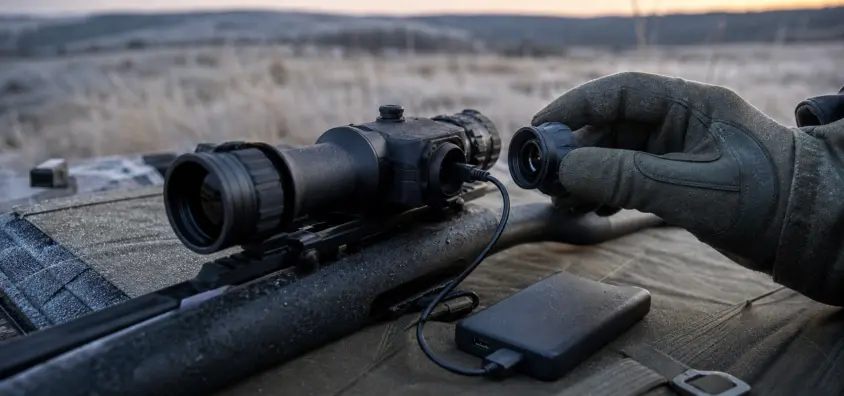
A thermal scope power bank can increase runtime, but at the expense of an additional cable, connector, mounting point and battery system. That is it adds failure points in the process.
Match Voltage/Current requirements to Optic Manual
Only use external power as per the scope manual. Simple 5V USB Power may be accepted by some optics. Some others may need special USB-C Power Delivery functionality. Some USB-C cables are charge only, some don’t have enough power, and some power banks switch off when the device’s power demand is minimal or fluctuates in standby mode.
Thermal scope external battery problems are often due to a mismatch, not the scope itself.
Test cable in motion before hunting.
That cable that functions on the kitchen table doesn’t necessarily function when the rifle is shouldered, carried on a sling, rested on a blind window or bumped in a UTV.
Try it out with the rifle unloaded. Shoulder the rifle, go through real-world positions, lay the rifle on sticks and on a rest, and observe if the scope flashes or resets. The cable must be at a stable angle in order to function and if it cannot be at that angle, then it’s not field ready.
Avoid snag points and weak connectors on rifles
Care needs to be taken with external power on a rifle. The long cables get caught in brush, tripod legs, blind windows, sling hardware and jacket cuffs. A snag may unplug the scope, damage the port or pull the rifle unexpectedly.
Keep short, secure and away from controls. A power bank should never be suspended from the USB-C port. The weight of the battery must not be supported by the connector.
How a scope can operate on external power and not on battery
If the scope functions fine when powered from an external source but not from its internal battery or removable battery, the problem maybe due to battery capacity, battery charging, the battery contacts, battery age, or battery management electronics. This is useful evidence for that pattern.
Write it down plainly: "Scope will operate for 90 minutes on external power, but will shut off immediately on the fully charged internal battery." That’s better than "thermal scope not charging" with no details.
Recoil and Mounting and Battery Movement
Power failures during recoil are a nuisance, as the scope might appear to be flawless up to the shot.
How a thermal scope can turn off after firing.
Batteries, caps, springs, latches or cables are briefly and temporarily displaced by recoil. The optic does not need to lose power for long periods of time. Reboot or shutdown can occur if a split-second interruption occurs.
This may look like a bigger rifle or optic reliability problem, particularly when it happens near zero confirmation. When shutdowns occur in conjunction with point of impact issues, separate out the power issue from mounting and zero checks. For the zero part of that question, there’s an article from NV Guide USA on thermal scope losing zero.
Battery lid (cap), spring pressure and recoil impulse.
Inspect battery door, cap threads, latch, spring, O-ring and contact surface. Check for caps that wear out, battery sleeves that move, or contacts that do not make good contact.
Never add foil, tape, spacers and home-made shims unless the manufacturer has specifically recommended that fix. Improvised contact pressure can damage the optic, battery or seal.
Suppressors, Small Caliber, Rest, and Semi-Auto Movement
Heavy rifles are not the only guns that have a recoil shutdown. A weak contact can be exposed by a semi-auto action, a rifle bouncing on a hard rest, by a suppressor changing impulse, or by rough side pressure from a blind window. You don’t need to "kick" the rifle that hard for the loose battery to move.
If feasible, attempt to duplicate the problem off the rifle. If the optic shuts off when gently tapped by hand and a known good battery is in place, this is a strong indicator of an intermittent power connection or service problem.
Advanced Tools that Consume Power Unusually Quickly
In some cases the scope is not damaged. It’s simply being used more than the runtime estimate assumed.
Wi-Fi and cell phone apps
Power is required to connect to Wi-Fi or phone app. They also take up an additional device, an additional battery, and an added connection that can draw attention from the primary problem. If testing runtime, turn Wi-Fi off first.
Video recording and RAV
There is enhanced load from video recording, recoil activated video and streaming. For recording, it relies on storage behaviour, menus and even app settings. For more information, please consult NV Guide USA’s Thermal Scope Video Recording Guide.
High screen brightness
There are times when a bright display would be nice, but it does take power. Maximum brightness can also interfere with night adaptation while in a dark blind or on a coyote stand. Use as much light as is needed to see the image but no more.
Rangefinding, menus and standby habits
Laser rangefinding and ballistic tools, frequent menu work, and constant display-on scanning all deplete run time. Standby can help, but if the scope doesn’t wake up reliably, and/or if the hunter is not aware of its sleep, recording, Wi-Fi and external power behavior, it will not help.
Firmware, Updates, Freezes, Hard Reset Caution
While firmware upgrades can enhance a thermal scope, it can make a bad night if rushed.
How interrupted firmware can cause startup issues
Stable power, correct files, correct model selection and following the official process are all necessary for a firmware update. An interrupted update or use of an incorrect file can cause the scope to freeze, not boot or display a black screen.
Avoid doing firmware work the day before a night hunt unless required by the manufacturer and you have time to test the optic following the work.
Refer to manufacturer’s model specific reset procedures only
A thermal scope hard reset is not universal. The button combinations; menu paths, USB tools, app workflows, and recovery procedures will depend on the manufacturer and the model.
Refer to the manual or to the scope’s official support site. When the scope is black, stuck or frozen after it has been updated, it’s safer to seek out official support than to guess.
Avoid button combinations from forums – do not make up your own.
Random reset combinations may be risky, forum advice may be helpful with symptoms. One model may have a sequence of buttons to do nothing in another, or it may delete settings that the hunter might need, such as profiles, zero, and/or calibration settings.
When resetting a scope with the manufacturer’s instructions, note the current version of firmware, settings and zero information, if possible.
Write down firmware version and the symptoms prior to contacting support.
Prior to contacting support, note the following information down: model, serial number (if available), firmware version, battery type, charger used, external power source, temperature, and exact time of failure. More than a "thermal scope troubleshooting needed" is a good support ticket. It communicates to support what has been changed and what has already been tested.
Field Troubleshooting Checklist
Follow this checklist, in order:
- Handle the rifle safely first. Point the muzzle in a safe direction, do not touch the trigger, and unload and verify clear before hands-on inspection whenever conditions allow.
- Use a known good charged battery that is approved for the optic.
- Check battery seating, cap, latch, spring pressure and compartment closure.
- Inspect thermal scope battery contacts for moisture, dirt, corrosion or bent parts.
- Retest cold batteries after warming; do not charge frozen batteries.
- If manual permits, use supported external power as a last resort.
- Put the cable and thermal scope power bank to the test in real motion.
- Turn off Wi-Fi, recording, app connection and high brightness for runtime testing.
- If possible, re-create the problem off the rifle.
- Record temperature, type of battery, method of charging, firmware, cable, settings, and failure times.
When to Stop Troubleshooting and Call Support
There are some power issues that are not field fixes.
Multiple shut downs using known good batteries
When the scope fails with several known good batteries in place, proper seating, clean contacts and normal temperature, remove the user error label.
Water in battery compartment or display
The presence of water within the battery compartment, under the display, or behind sealed areas is a support issue. Drying the exterior is not equivalent to the solution to the problem of inside dampness.
Scope only works on external power
A thermal scope that requires power via the cord and repeatedly fails to operate on an internal battery or removable battery system may require battery or internal power path service.
Firmware fails, or black screen after updating.
If the device does not show the screen after an update – it is addressed by official support instructions. Never try to test out different files or reset sequences!
Recoil shutoff that is repeated after cap/contact checks.
If a thermal scope stops working after a shot, even after checking battery seating, cap, latch and contacts, contact the dealer or manufacturer. The power loss can become a repeatable reliability issue due to recoil.
Prevention Routine Before a Night Hunt
It is easier to remedy a power problem at home than in a cold field at 1 a.m.
Charge and test at home
Be sure to charge scope and spare batteries in time to perform a brief test. Turn on, allow optic to stabilize, navigate through menus, and test start/stop recording (if applicable), and test standby mode.
Carry a spare battery or a tested power bank
Only a spare battery which is charged, compatible, protected, and proved, can be useful. This also applies to a power bank. Check out the entire rig including scope, cable, power bank, routing, and rifle motion.
Confirm recording/Wi-Fi settings before leaving
If you’re not using Wi-Fi, disable it. Don’t record if you don’t need it to be recorded. In case you are using recording, check before you go out.
Maintain a power problem log
Identifying patterns with a simple log. Record the date, temperature, battery, operating time, settings and shutdown. When the same battery fails the second time and the other battery works, the answer is, perhaps, obvious.
Quick FAQ
My thermal scope doesn’t power on when fully charged.
A full indicator does not guarantee that the battery will be able to provide steady power. Test seating, cap closure, battery type and contacts, cold exposure and test with a known good battery. If it still doesn’t turn on, then contact support.
I am having an issue with my thermal scope turning off after shooting.
The most frequent causes are battery movement, a loose cap, loss of spring pressure, a latch problem or an external cable losing contact under recoil. Unload the rifle before inspecting anything.
Can cold weather make a thermal scope die early?
Yes. Cold decreases the amount of battery output and can significantly shorten the battery life. Store spare batteries in a safe case, in a warm environment and do not charge batteries that are frozen.
Can you use a thermal scope with a power bank?
It can be safe if the manual indicates that external power is supported and the power bank, cable, voltage and current are compatible with the requirements of the optic. Make sure to test the overall configuration prior to hunting and ensure the cable does not snag or put pressure on the USB-C port.
Should I update firmware prior to a hunt?
Usually not right before leaving. Firmware updates need to be performed with stable power supply, the proper official firmware / app and sufficient time to test start up, menus, recording, zero profiles, and battery behavior.
When is a power problem a warranty issue?
It can be a problem with either the warranty or the service, if the scope keeps turning off with known-good batteries, won’t charge with known-good batteries, requires external power to operate, shows signs of moisture in the case, battery contacts are damaged, the scope freezes after running through the official firmware or when under recoil that basic cap and contact checks do not resolve.
IR Illuminator Not Working With Night Vision? Beam, Battery, Focus and Compatibility Check.
Is your NV not turning on? Battery, Contacts, Mount and Tube-Safe Troubleshooting
Night Vision Collimation and Alignment: Fix Double Vision, Eye Strain and Dual-Tube Setup Issues