
June 23, 2026
How to Record Thermal Scope Video: RAV, Wi-Fi Apps, SD Cards, and Field Mistakes
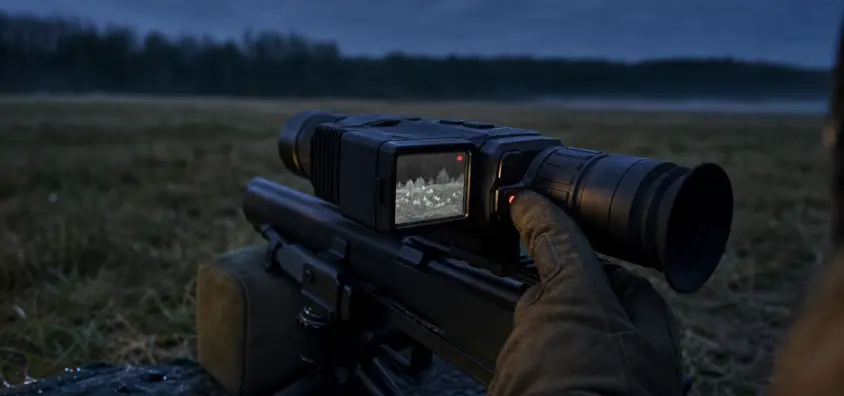
Sure, thermal scope video recording is easy, until you’re on the first hunt when the file is not there, the clip starts too late, the app fails to connect, or the battery goes down too quickly. While modern thermal scopes can make recording easier, recording does involve additional variables: storage, firmware, permissions on phones, Wi-Fi, RAV sensitivity, and pressure habits of the user.
But how to record thermal scope footage is not the only question. It is the manner in which it is recorded without interfering with target identification, rifle handling, safety or the hunt itself.
The Short Version
For reliable thermal scope recording, test the complete workflow prior to the hunt.
- Top up the scope, spare batteries, phone and any compatible power bank.
- Make sure to check if scope has its own memory, removeable microSD, app transfer or anything else.
- Monitor free space and only store information supported by the manufacturer.
- Make a brief test recording, and play or transfer it.
- Determine if manual recording, recoil activated video, Wi-Fi/APP controlled or a mix will be used.
- Make sure that the focus, NUC/calibration, palette, brightness and zoom are correct before evaluating the video quality.
- Wi-Fi is disabled in the field unless required.
- Make a backup of important clips after the hunt before deleting files, formatting cards and changing firmware.
Recordings can be used to review a miss, to study animal movement or to share hunt footage from a thermal scope. It cannot prove legal positive identification, cannot show all things outside the display and cannot replace backstop awareness. Fire the rifle first. Record second.
Why Thermal Scope Recording Differs From a Regular Camera
A thermal scope is already taking in an image prior to recording begins. The sensor senses the heat difference, which is then processed into a visual image, and displayed to your eye. Settings like gain, contrast, brightness, sharpness, palette, digital zoom and NUC/calibration have the potential to impact both the live view and the saved clip.
That’s why thermal video settings cannot be considered like those of a phone camera. If the objective focus is not clear, the recorded video will appear blurry. The clip may be washed out if it is in thermal crossover, humid, rainy or foggy. The file can be blocky or noisy if the digital zoom is high. This guide to thermal scope image quality problems is the logical troubleshooting partner to NV Guide USA’s guide here.
The quality of the recorded thermal footage can also vary from what is seen through the eyepiece. Some models have different compression, recording limits, app transfer and display capture behavior. There is a relationship between sensor quality, display resolution and recording resolution, but they are not the same. To view what it takes to receive that distinction, look at NV Guide USA’s article about thermal scope display resolution.
Most importantly, video is a review tool NOT the decision-maker. There is no substitute for positive identification, local hunting laws, or a safe backstop when dealing with a saved file.
The Primary Methods for Capturing Videos Using Thermal Cameras
The variety of features found in thermal scope recording software is far reaching. Not all models are equipped with the following features: RAV, Wi-Fi, audio, internal memory, removable SD cards or app control.
Manual onboard recording
Manual recording is the most controlled method. You begin recording before the action is critical and the scope saves the recording to any storage system that it supports. It is typically the most secure option when pigs are already in close proximity to a feeder or coyote is responding to a call.
The vulnerability is in human error. When hunters are dealing with wind and animals, safety, communication, and target ID, they forget to press record. If you are going to do it by hand, familiarize yourself with the button by feel and try it on with gloves.
Recoil-activated video (RAV)
A recoil activated video thermal scope is a type of thermal scope that is designed to start or save video when it detects a shot. Though they are not magic, RAV thermal scope features are handy for those hunters who forget to manually record.
If it’s not on, the storage is full, the battery runs out, firmware resets settings, recoil is too light, or rifle settings change the impulse felt by the scope, RAV can miss it or start late. Recoil detection can be influenced by light calibers, suppressors, heavy rifles, semi auto action, firm tripods and various rests. Adjustment of sensitivity or calibration of some scopes may be possible; some may not.
There are also variations in pre-shot buffer behavior. Don’t presume that if another scope records the footage, your scope does too. Make sure there is no ambiguity about the manual and then test it out with your rifle.
Wi-Fi streaming and phone apps
A thermal scope Wi-Fi app can include live view, file downloading, firmware updates, remote control, image settings, or even recording control. Specific features vary according to the model.
Apps can come in handy at home or in the truck. Can become fragile in the field. Locking phones, permissions switch, batteries get drained, wireless connections go down, and touch screens are not good controls in cold weather and/or in gloves. Apply the app when it is a real problem. If you want to use a phone connection in your shots, do not make the entire shot dependent on the connection if you haven’t tried out the connection under similar conditions.
External recording options
External output or recording with cables or accessories is possible with some optics. This is model specific: treat that. For some users external recording can be beneficial but it comes with cables, power consumption, snag points and another piece of equipment to withstand recoil and field use.
SD Cards, Internal Storage, and File Management
It is important to understand that many problems associated with thermal scope recordings are storage problems and NOT optics problems.
There are scopes that have internal storage. Others feature microSD cards that can be removed. Some might use both, or a different system. Simple internal storage as there’s no card to lose. A thermal scope SD card is flexible, provided that the card is compatible, properly installed, formatted as directed and test run prior to the hunt.
Follow the manufacturer’s card type, capacity, and format guidelines. Steer clear of bargain cards from shady vendors. Never format a card or change storage or firmware immediately prior to an important hunt if you cannot record and play back a test clip afterwards.
Ordinary causes for files disappearing or being corrupted:
- Saving process failed due to battery failure.
- Storage filled mid-recording.
- Card was taken out from the file prior to closure.
- The clip recorded in internal memory was collected by the hunter when he or she was checking the card.
- The phone application had an incomplete file list.
- The firmware/APP behavior has been altered following an update.
Download important clips after the hunt and make sure the clips open before deleting anything. If the footage is of importance to check a shot, save the original file until the footage has been checked.
Wi-Fi Apps and Battery Drain
Common errors that prevent thermal scope apps from connecting are the phone being on the wrong Wi-Fi network, app permissions not being set, the app and scope firmware not being in sync, the scope’s Wi-Fi expiring, another phone already connected or the password being changed after the scope was reset.
Pair up the app at home. Review family rules at home. Get files downloaded at home if possible. Do not attempt to trouble shoot a phone when animals are in motion.
Wi-Fi generally requires more power, particularly when recording, streaming, when it’s cold, when the screen is bright, and when the menus are being used all the time. Thermal scope battery drain for Wi-Fi is not useful since it depends on the model and condition. The habit of the field is easy—connect, do the work, then switch off the WiFi. For general runtime planning, please refer to NV Guide USA’s thermal scope battery life guide, which discusses the pros and cons of internal versus removable batteries, as well as power banks and cold weather conditions.
Why Thermal Scope Footage May Appear Grainy, Washed Out, or Blurry
Don’t blame the recorder, first check the image!
Adjust the diopter to get the reticle and menu text in sharp focus. Set objective at distance you are interested in. If the image appears stale, uneven or smeared, run NUC or calibration. Use gain, contrast, brightness and sharpness sparingly. NV Guide USA has more info on how to focus a thermal scope, thermal NUC and thermal scope settings.
Another complaint often associated with thermal scope footage is that of the poor quality of digital zoom. Digital Zoom allows you to magnify the image information recorded by the sensor. It can be used to aim or observe but typically will cause the saved video to be more grainy and blocky. If a clip appears rough at high zoom, try and compare at base zoom.
Weather matters too. Contrast may be decreased by humidity, fog, drizzle, warm ground, and thermal crossover. When the recording appears flat, the scope might be functioning properly. For that portion of the diagnosis, refer to NV Guide USA’s thermal crossover explained.
Audio, Metadata, and Privacy
Depending on the model, thermal scope audio recording varies. Some scopes record sound, some don’t and some may take care of sound via the device, app or setting. Don’t take audio for granted or assume it’s appropriate – check the manual and think about local recording laws.
Consider privacy, as well. A clip can have spoken names, property information, landmarks, times, names of the files, app data, location-specific information and more. Check the file before posting hunting clips to see what they contain in addition to the animal and reticle.
Share responsibly. Careless clips, especially when identifying targets, backstopping or accessing properties, do not assist hunters.
Pre-Hunt Recording Checklist
Use this prior to any hunt in which footage is a factor:
- Charge the scope, phone, spare batteries and supported power bank.
- Check recording mode (manual, RAV, app control, or other).
- Check storage, card recognition and free space.
- Movie a brief test clip and play it back.
- Check diopter, objective focus, NUC/calibration behavior, palette, brightness, gain, contrast and sharpness.
- Check and verify the correct rifle profile and zero before serious rifle use.
- If using RAV, check it in the actual rifle setup in a safe and legal manner.
- When using an app, pair up before you leave and be familiar with how to record without it.
- Disconnect Wi-Fi connections when not necessary.
- Backup important footage after hunt.
While recording can be a great way to review a shot, it does not confirm zero alone. Use a real zero log and controlled live fire for any question of zero behavior. In that workflow belongs NV Guide USA’s thermal scope losing zero guide.
Troubleshooting: Why Your Thermal Scope Video Did Not Record
Thermal imager videos are a wonderful resource for troubleshooting.
In the following order, work through the possible causes:
- RAV was not enabled. Check profile and if settings were changed after reset/firmware upgrade.
- Storage was full or not supported. Check free space, card recognition, internal memory, manufacturer storage guidelines.
- App connection failed. Check Wi-Fi network, permissions, firmware/app version, and scope timed out.
- Low battery voltage stopped recording or saving files. Battery voltage can be affected by the cold weather.
- No recoil observed. Test RAV with caliber, suppressor state, mount, rest, sensitivity settings (if available).
- Manual recording by the user was forgotten. This is common. If your scope allows for manual recording, begin recording sooner or use RAV as a fall-back.
Change no more than 5 variables at a time. Change one probable cause, make a test clip and playback.
What Recording Features Matter When Buying a Thermal Scope
The top thermal scope characteristics are the ones that you will use appropriately in the dark.
Find easily accessible manual recording controls. Only consider RAV or a pre-shot buffer once you are sure of the actual behavior of the model. Know if you prefer internal storage or removable card storage. Consider the stability of the app and transfer speed to be practical and not marketing extras. Consider battery impact when recording long calling stands or hog hunts. Gloves with lots of features but simple controls are more important than the opposite.
Don’t purchase a scope solely because it has a great recording spec. The thermal image, zero reliability, mount, battery system, controls and field usability are all still more important than the clip.
Final Field Rule
Video hunt but fire rifle first.
When it aids the hunt, thermal scope video recording is beneficial. The problem is that when the shooter is focused more on that clip than the target ID, backstop, safety, wind, zero, or local law, then it becomes a liability. Prepare recording system pre-hunt, test and focus attention.
Having good footage is nice. It’s more important to get a safe, legal and well-executed shot.
Quick FAQ
Do all thermal scopes record video?
No. Some thermal scopes have internal recording, some have a video app, some have internal storage, some have removable cards, and some don’t record video at all. Look for the model number.
Does recoil video really work?
If it is reliable on your rifle it can be worth it. Always test RAV before using it on a hunt using your caliber, mount, suppressor state, storage setup and battery.
Why does my recorded thermal footage look worse than the live image?
Recorded footage can be compressed, of limited resolution, zoomed digitally, affected by focus or NUC, and due to settings, humidity, thermal crossover, or app transfer. The live eyepiece image and recorded file may not be exactly the same.
Does Wi-Fi reduce thermal scope battery life?
The power consumption of a Wi-Fi is generally high, particularly when recording, streaming, cold weather, and high brightness. Field use only as necessary.
Does a thermal scope have audio?
Some can record audio and others can’t. Audio support, microphone behavior and settings vary. Read the manual and be aware of privacy and local recording laws.
What tests should I do before I hunt with RAV?
Enable RAV, check that the storage and battery are good, shoot controlled test shot (where safe and legal), and review if the shot was captured in the file as desired. If the scope has sensitivity settings, check them with the rifle you intend to hunt with.
IR Illuminator Not Working With Night Vision? Beam, Battery, Focus and Compatibility Check.
Is your NV not turning on? Battery, Contacts, Mount and Tube-Safe Troubleshooting
Night Vision Collimation and Alignment: Fix Double Vision, Eye Strain and Dual-Tube Setup Issues