
June 28, 2026
Thermal Scope Fogging Up? Condensation, Dew, Internal Moisture, and Cold-Weather Fixes
Thermal scope fogging in the field can seem like a scope failure, particularly following a warm truck, a cold blind or a wet hunt with a case opened. The picture appears milky, or the lens develops dew or the eyepiece gets cloudy when you sit down behind the rifle.
Slow down. Fogging is not one problem. External dew on the objective lens, condensation on the eyepiece, moisture in a case, or actual internal fogging in the sealed optic are different issues with different fixes and varying concerns.
This is a handy troubleshooting guide for hunters who are using their thermal scopes in cold, damp, rainy, foggy or rapidly changing weather. To learn more about thermal ownership guides, check out NV Guide USA’s Thermal Scopes & Imaging category.
The Short Version
When the thermal scope is fogging up due to thermal issues, proceed with the following:
- Handle the optic, case, lens cloth, phone or batteries after the rifle has been put into a safe condition.
- Determine if the moisture is on the exterior of the objective lens, on the eyepiece side, in the case foam, in the battery compartment, or in the interior of the optic.
- Do not rush the temperature change of the optic.
- Gently dry external moisture with clean, optic-safe materials.
- Never dry wipe dirt, sand or grit over a thermal objective lens.
- Never seal wet gear in foam following rain, fog, snow or heavy dew.
- Use desiccant in the case, but don’t rely on it to overcome poor storage practices.
- After moisture has cleared, recheck focus, NUC/calibration, brightness and contrast.
- If thermal scope internal fogging and/or thermal scope moisture inside the sealed unit is observed, contact official support.
Fogging also isn’t the same as low thermal contrast, bad focus or thermal crossover. On a wet evening, a scope may appear to be washed out while the lens is dry.
First, Identify What Kind of Fogging You Have
Externally Deposited Dew or Fog on the Objective Lens
Thermal scope dew on lens typically refers to condensation on the front outside lens or cover. There might be some small droplets, or either a dull film or a hazy image that clears up after the outside dries. This typically occurs near wet vegetation, fog, drizzle or when sitting for a long period in heavy dew.
Dew from outside is generally controllable, but should be treated with care. Many thermal objective lenses contain germanium or other materials which transmit infrared wavelengths, and whose coatings should not be treated as window glass. Never use a shirt sleeve, paper towel, household glass cleaner or random solvent. If grit is found, clean away loose items prior to wiping. How to clean and maintain a thermal scope is the suitable support post for safe thermal scope lens care.
Fogging at the Eyepiece/Display End
Fogging of the eyepiece is often due to breath, heat on the face, wet gloves, a damp face covering or from moving from the heat of the truck to the cold air. A fine objective lens, but the eyepiece, rubber eyecup or display-side surface is clouded over.
Look at the menu and reticle. If text in the menu and the reticles appear hazy, it is not a problem with the sensor or front lens; it is a problem on the eyepiece side or diopter side. If reticle is clear, animal or background is fuzzy, check objective focus, distance, weather or image setting.
Case Moisture and Storage Condensation
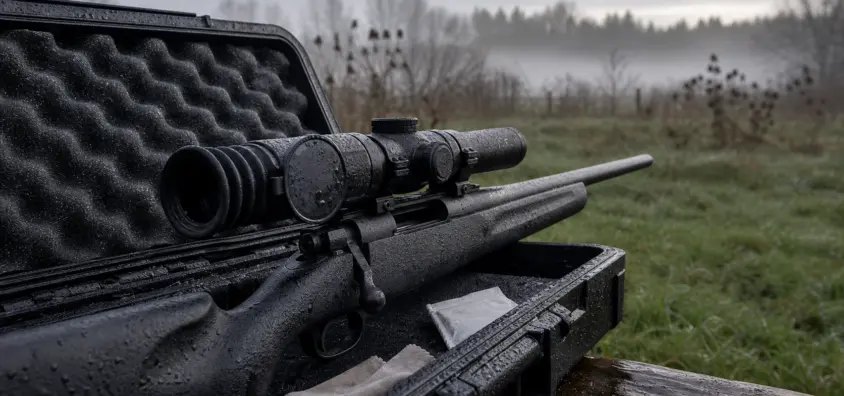
One of the common problems that are owner created is thermal scope storage moisture. A hard case will keep them safe from impact, and foam can also hold moisture. A moisture box is simply a sealed case containing a wet scope, damp sling, soaked gloves and a wet cloth.
Wet storage is not weather resistant. The IP ratings are measurements of water and dust resistance under certain conditions, and do not imply that an optic should be packed wet for days. With regards to the weather resistance, refer to NV Guide USA’s guide to NV IP ratings and waterproofing explained.
A thermal scope desiccant case setup is helpful, provided the case and equipment are permitted to dry and the desiccant is recharged or replaced as necessary.
Internal Moisture or Fog Inside the Optic
The moisture inside the optic is not the same as outside dew. Once fog, haze, droplets or water marks form inside enclosed spaces or behind surfaces that are inaccessible for safe cleaning, discontinue treating it like regular condensation.
Chronic thermal scope internal fogging may be caused by water intrusion, seal failure, impact damage, damage to the port cover or other service problems. Never disassemble the optic. Don’t bake it, use a heat gun, pour anything in it or use an internet drying trick. If internal thermal scope moisture occurs, it is a manufacturer or qualified-support problem.
Why Thermal Scopes Fog in Cold, Humid, and Wet Conditions
Temperature Changes and Acclimation
The condensation that occurs is caused by the contact of moist air with a surface where the temperature of the surface is cold enough to cause the water vapor to condense. Cold scopes may fog when they are introduced to warm humid air. Moisture can also accumulate on a warm scope that is brought into cold wet air.
That’s why acclimation is important. Fogging tendencies are greater when moving from a heated truck to the cold night air and breathing into the eyepiece. The opening of a cold sealed case inside a warm room can also promote condensation on cold surfaces.
Humidity, Dew Point, Fog and Wet Vegetation
Moisture problems are all magnified by high humidity. Exterior surfaces may be exposed to moisture because of fog, drizzle, damp brush, wet grass, and low wind. This is also where the thermal scope humidity issues relate to image performance.
The useable thermal contrast can be reduced by humid air, fog, rain and wet vegetation. Even after the lens is dried, the scope may appear flat. If the entire image is washed out, check out NV Guide USA’s guides to thermal crossover and thermal scope image quality problems.
Heat, Breath, Gloves, Blind Windows, Truck Heat
There is some self-incurred fogging. This can be repeated all night by breathing into the eyepiece, wiping with a wet glove, placing the optic near a fogged blind window or cycling the optic repeatedly between the heat of a truck and the cold air.
Truck heat is nice, but can lead to rapid changes. When hunting from a heated blind or vehicle, allow it to acclimatize before deciding on image.
What to Do in the Field When a Thermal Scope Fogs Up
Handle Gun Safely First Before Troubleshooting
Always keep the muzzle pointed in a safe direction, never put your finger on the trigger, and always follow your normal procedure for safe conditions. Target identification, backstop awareness, muzzle control and local law always take precedence over moisture troubleshooting.
Avoid Dry Wiping Dirt or Grit
Gentle drying may be all that is necessary if only the front lens has condensation that is clean. If it has dust, sand, mud film or grit, don’t drag a cloth over it. If you think of dust as harmless fog, you will have a scratch problem if the dusty thermal lens is involved.
Follow manufacturer’s lens-care instructions first. In addition, take extra precautions when using anti-fog products. Not all types of lens materials and coatings are safe with anti-fog spray. Avoid if not recommended in the manual or official support.
Give the Optic a Chance to Acclimate
Wiping may only be helpful for a few minutes if thermal scope cold weather condensation is caused by the change in temperature. When outdoor conditions allow, let the optic approach that temperature. Do not frequently move it from warm air to cold air and vice versa.
Make Sure External Surfaces Are Dry Before Storing
After thermal scope wet weather use: dry the outside after thermal scope use before storing. Inspect caps, port caps, eyepiece, exterior battery compartment, mount, straps, case foam and accessories. Don’t lock the optic in wet foam.
Before sealing, let optic/case dry in a safe indoor location. To learn more about storage, check out NV Guide USA’s guide on how to transport and store night vision gear.
After Moisture Has Dried Up, Recheck Focus, NUC, Brightness and Contrast
When you can see through moisture, do the following before pointing fingers at the optic:
- Diopter: Menu text and reticle should be clear to your eye.
- Objective focus: focus for distance to target.
- NUC/calibration: run when image appears stale, uneven, smeared.
- Brightness: do not make the screen too bright at night.
- Contrast/gain: set carefully for the current conditions.
- Palette: don’t rush for the specialty palette, first compare the white hot and black hot.
For more help with a setup, check out how to focus a thermal scope and thermal NUC explained, why your scope clicks.
Prevention Routine Before and After a Hunt
Pre-Hunt Moisture Check
Prior to departure, check the objective lens, eyepiece, caps, port covers, mount, batteries and case. Ensure that the case foam is dry. Have a clean lens cloth or approved cleaning kit in a dry bag. Check the activity of the desiccant.
Battery maintenance is also an important issue. Avoid charging batteries when frozen or when the ambient temperature is not within the manufacturer’s recommended temperature range. However, when battery life is an issue in cold weather, it can be confused with an optics issue, so check out NV Guide USA’s thermal scope battery life guide.
During the Hunt
If conditions permit, caps are to be kept managed when the optic is not in use. Do not place the scope on wet grass, snow or mud. Keep external power cords and phone communications away from the water. Try not to breathe into the eyepiece. Before changing all the settings, determine the source of moisture if the image becomes milky.
After the Hunt
Develop the same routine each time:
- Before doing any gear work, make the rifle safe.
- Dry out outside moisture on optic and mount with clean materials.
- Check on ports, caps, eyecup, battery and case.
- Take out removable batteries and store them if the instructions for the manual say to.
- Allow the optic and case to dry out before closing.
- Add or change desiccant as necessary.
- Note any abnormal fogging, shut down, image problem, or battery problem.
Fogging vs. Image Quality Problems
Fogging Can Be Confused With a Poor Sensor
An external fog can cause a good scope to look soft, milky and low-contrast. If the picture gets better when the lens or eyepiece dries then it’s likely the sensor is not the problem.
When Weather Is the Real Limit
At times the scope is dry and the vision remains poor. Weak heat separation in the scene is the cause of thermal scope low contrast humidity problems. Confidence range can be lowered by fog, drizzle, wet brush, warm ground, and thermal crossover. Heat contrast can’t be created by settings, it can only be improved.
When It Is a Matter of Focus and Settings
If the reticle and the menu are clear but the animal is not, check objective focus, distance, digital zoom, weather and settings. If the reticle and the menu are hazy, first check the eyepiece side, the diopter and the display brightness.
When to Stop Troubleshooting and Call Support
Possible Internal Moisture or Seal Failure
If you see these signs, contact the manufacturer, dealer, or qualified support:
- Fog, haze, drops or water marks within enclosed spaces.
- Moisture that doesn’t dry out with normal external drying.
- Fogging repeated after exposure of mild weather.
- Water intrusion due to a damaged port cover, battery cap or impact.
- Corrosion on or around contacts or batteries.
- Display artefacts, shut-down or control failures following wet exposure.
- Scope that is not turning on following a rainfall or period of condensation.
If power issues are a symptom then look at NV Guide USA’s article about a thermal scope that won’t turn on or keeps shutting off.
What to Document for Support
Record the brand, exact model, serial number, date, weather, location of moisture, type of battery, type of storage, and if covers and doors were opened. If it is safe to do so, take a photo of the problem before cleaning. Record any submersion, drop, impact or wet storage.
What Not to Do
Never disassemble a thermal scope in any way, apply harsh heat, put the scope in rice, pour chemicals into openings, use unapproved anti-fog spray, charge a battery when frozen or outside the manufacturer’s recommended temperature range, or continue troubleshooting behind a loaded rifle.
Field Checklist: Thermal Scope Fogging and Condensation
Here are some tips to help you use the thermal scope to identify fog and condensation in the field:
- Safe muzzle, finger off trigger, rifle safe.
- Check if the moisture is in the objective, the eyepiece, the case, the battery area, or is internal.
- If the outside lens is wet, inspect for grit prior to wiping.
- Ensure that only clean optic-safe materials and manufacturer recommended cleaning procedures are used.
- Allow the optic to acclimate following truck to cold or cold to warm exposures.
- Dry exterior surfaces, caps, ports, mount and case before storing.
- Avoid sealing of wet gear in foam.
- Keep case dry, use desiccant.
- Double check diopter, objective focus, NUC, brightness, contrast and palette.
- Decrease the confidence interval in humidity, fog, rain, wet vegetation, or crossover.
- Record moisture issues that have occurred regularly and/or in an unusual manner.
- If internal fogging or moisture in the optic occurs, contact official support.
Quick FAQ
My Thermal Scope Is Fogging When I Get Out of My Truck
Frequent temperature fluctuations can lead to condensation. Fogging will be more likely if the temperature of the truck is warmer than the outside air, if the outside air is humid, and if the user breathes near the eyepiece. Allow the optic to settle in to assess the image.
Does the Condensation of the Outside Lens Pose a Danger?
Typically, condensation visible from the outside is easy to handle. The danger is associated with wiping the lens with grit, using chemicals that have not been approved, or leaving the lens wet.
What About Using Anti-Fog Spray on a Thermal Scope Lens?
Don’t take anti-fog spray for granted! Thermal lenses and coatings are not the same. Do not use any product specifically not recommended by the official manual or support for the given lens.
Why Is My Thermal Image Washed Out in Humid Weather?
Heat separation can be diminished by humidity, fog, drizzle, wet brush and thermal crossover. The scope may be dry and still look flat, due to poor thermal contrast.
With Regard to Thermal Imaging, What Is an Internal Fog?
Internal fogging may be a sign of moisture within a closed optic. Don’t treat it as a regular dew – make a note of the problem and call official support.
Is a Hard Case a Better Option to Store My Scope After a Wet Hunt?
Store in a hard case, but don’t enclose wet equipment in foam. Dry optic, case, straps and accessories first. Drying the gear is not the same as desiccant – use desiccant as backup only.
Final Field Rule
Fogged thermal scope does not mean broken. Field-care problem external dew. Handling and temperature is often a problem for eyepiece fog. Having wet foam is a storage issue. Humidity within the closed optic is a support issue.
Work in that order, don’t be pressured by a milky image to shoot without positive identification and a safe backstop, and keep the rifle safe, and protect the thermal lens.
IR Illuminator Not Working With Night Vision? Beam, Battery, Focus and Compatibility Check.
Is your NV not turning on? Battery, Contacts, Mount and Tube-Safe Troubleshooting
Night Vision Collimation and Alignment: Fix Double Vision, Eye Strain and Dual-Tube Setup Issues